Centering images within a blog post

Hey, I’m trying to centre images within my blog post, but can’t figure out how.

First of all, I’m able to with the visual editor, but I’m using shortcode for image captions and need to add that in text editor. Whenever I open the visual editor, the caption part of my code disappears, leaving me to go back and re-insert it to every image.

This is the code I’m using for images:
[caption align=“align###” width="###" class=“imgcaptions”] ###[/caption]

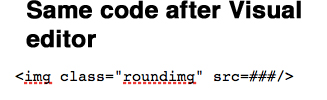
This is what happens to it when I open visual editor:

I’ve tried adding class=“aligncenter” within the image itself without luck. align=“alignleft” and “alignright” work fine, but nothing else does. There’s got to be a way to centre and image and keep this code… I’m losing my mind over these tiny roadblocks.


Hello @kerridawn,

Thanks for asking. :slight_smile:

Can you please share website URL for us to take a closer look? Along with that it seems that the image was not uploaded in your ticket. Can you please share the images again?

Thanks.

I don’t know what happened, but it’s working now. This seems to happen every time I actually ask for help, it starts working soon after.

align=“aligncenter” does the trick. I don’t know why it wouldn’t before, but I tried every different combination and nothing.

Oh, and I see what happened in my original post, the code didn’t fully show up. I’ll attach two images below showing the before and after visual editor.

While on the topic though (I was going to save it for another post), with that code above, how can I change the font size? Currently it’s readable, but probably not for everyone…

Thanks again for the quick response!

Hi There,

It could be a temporary caching issue. Glad it works for you now.

To increase font size, you can simply assign a unique CSS class to your element or shortcode.

Example
class="imgcaptions my-custom-font"

Then you can add your CSS rules into your Theme Options > Global CSS area.

.my-custom-font {
font-size:18px !important;
}

Hope that helps.

1 Like

Fantastic! Worked perfectly.

Thank you!

You’re welcome!
We’re glad we were able to help you out.

This topic was automatically closed 10 days after the last reply. New replies are no longer allowed.