How do i center a button on my homepage. When i click “primary text align” it doesn’t seem to do anything. I don’t want to align the whole column to the center, just the button. Any help would be appreciated.
Hi Brandon,
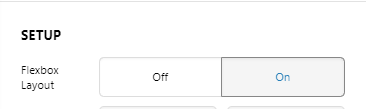
Thank you for reaching out to us. To align just a button, you can add a Row element to the column and select 1 column layout and move your button inside. Go to column’s settings of the newly added Row, under Setup turn on Flexbox Layout option:
Now under Flexbox title, set Align Horizontal to Center
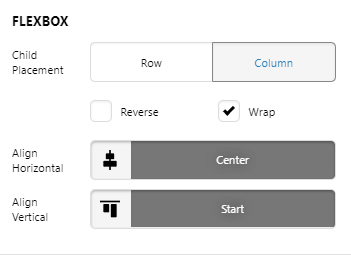
This will center only your button and won’t effect any other element inside the main column. Hope this helps!
1 Like
This topic was automatically closed 10 days after the last reply. New replies are no longer allowed.