Center the text above the button

Hello, I want to center the text above the button.

It works if I set the Width and Max width of the text element to Auto. But then the text becomes too wide.

I want the text to have a max width of 800 pixels, as this makes it much easier to read. But I also want it to be centered horisontally on the page.

What would be the best way of achieving this? Thank you for your help :slight_smile:

Hey @HannaHa,

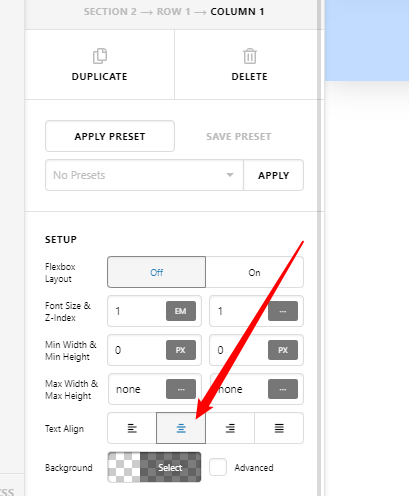
Try setting the Column’s Text Align option to Center.

image

If that doesn’t help, please provide the URL of the page where we could see the actual setup so we can give an accurate solution.

Thanks.

I have, but it makes no difference. Sending you my login details now.

i belive the margin for left and right of the element is not set to auto. try to set margin left: auto and margin right:auto.

cheers

@deranaloge I wrote this in my first post:

“It works if I set the Width and Max width of the text element to Auto . But then the text becomes too wide.”

I appreciate the help, but I’m not sure how your solution is different?

hi hannaha,
if margin is set to 0 instead of auto, the text element does align on the left side. so it cant be centered.
try it with the settings in my screenshot. it works here.

@deranaloge Oh, the element margin! For some reason I didn’t pick up on that in your first post. Yes, that works great, thank you so much :slight_smile:

Hey @deranaloge,

It’s good to know that you have found the solution to your issue.

@HannaHa: Thanks for chiming in!

Best Regards.

This topic was automatically closed 10 days after the last reply. New replies are no longer allowed.