Center align sticky header with left sidebar

Hi!

I am using Pro and have set up a sticky header. I am using a left sidebar on some pages and when scrolling on these pages the sticky header gets pushed to the right for some reason. I have tried realign it with various CSS but I cant do it. Have you got any idea how to fix this?

Thanks!
Kalle
Hey Kalle,

Thanks for writing in! To resolve your issue, please add the following CSS code in the X > Launch > Theme Options > Global CSS (http://prntscr.com/evui3r)

.hm4.x-bar.x-bar-top.x-bar-h.x-bar-relative.x-hide-sm.x-hide-xs.x-bar-outer-spacers.x-bar-fixed {
    max-width: calc(100% - 310px);
}

We would loved to know if this has work for you. Thank you.

Thanks! Now it looks good on the pages with sidebar. However, the menu now gets pushed to the left on the pages without sidebar. This page for example: https://anatomifysiologi.se/

Please update the custom CSS to this:

.x-sidebar-content-active .hm4.x-bar.x-bar-top.x-bar-h.x-bar-relative.x-hide-sm.x-hide-xs.x-bar-outer-spacers.x-bar-fixed {
    max-width: calc(100% - 310px);
}

I tried with that CSS but it didn’t work i’m afraid.

Hi there,

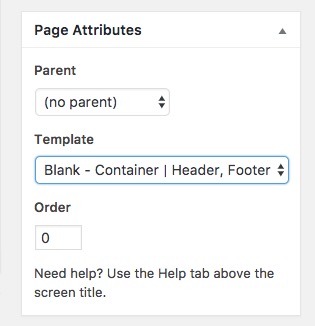
Please kindly keep the second set of code that my colleague proposed, but then go to the pages that you do not have the sidebar and from the top right section of the edit page set the template to something that does not have sidebar:

If you need further assistance kindly get back to us with the URL/User/Pass of your Wordpress Dashboard using the Secure Note functionality.

Thank you.

Great! Now it works, thank you very much for your help!

You’re welcome :slight_smile:

This topic was automatically closed 10 days after the last reply. New replies are no longer allowed.