I’m just trying to center text in a section that contains a shortcode. I should just be able to use text-align:center but it is not working. Why won’t text:align:center work in this case? The code that I added to Section 3 above the shortcode is below.
UPCOMING EVENTS
Hello @eutaw,
Thanks for writing in! To center the contents of a text element, use the “Text Align” option in the Text Format in the element settings:
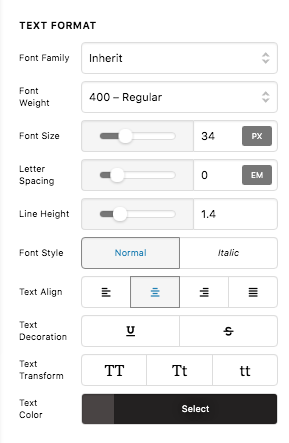
You do not need to insert any inline CSS code. Let us know how it goes.
I tried that and it centers the information from the shortcode as well. I only want to center a title above the shortcode. The code I used is below.
UPCOMING EVENTS
No worries. I figured it out. I needed to use <p> instead of <span>. Thanks for your help.
But there is one other thing. How do I remove the social media icons from the footer? I know I can remove the entire footer with the following, but I only want to remove the social media icons.
.mec-event-footer
{
display: none;
}
Hello @eutaw,
You need to use the Google Chrome Developer Toolbar to check the live HTML code and find which CSS selector you need to use.
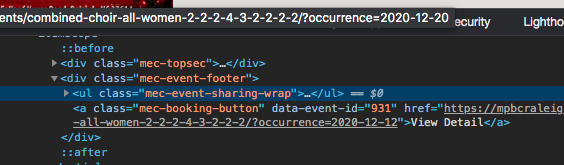
Based on the screenshot, you will be using this class: mec-event-sharing-wrap. Therefore, the code will be:
 .mec-event-sharing-wrap {
  display: none;
}
Be advised that custom coding is beyond the scope of our support. The code above is only an example to get you started with what you wanted. Feel free to make adjustments to your styling and be responsible for maintaining the code.
Best Regards.
This topic was automatically closed 10 days after the last reply. New replies are no longer allowed.