Cart Item Anchor Text Styling

Hey,

I am applying custom CSS to the class:

$el .x-anchor-text {
  position: absolute;
  background: #7b9e89;
  border-radius: 100em;
  width: 1.5em;
  height: 1.5em;
  text-align: center;
  display: flex;
  justify-content: center;
  align-items: center;
  bottom: -10px;
  right: -10px;
}

I am using the dynamic text {{dc:woocommerce:cart_items}} on a Cart Dropdown element.

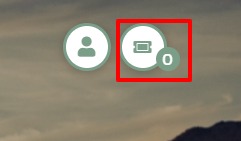
Screenshot 2021-05-18 at 13.31.06

The z-index value cannot be applied to the anchor text, so it is being ‘hidden’ - any suggestions here?

See live: https://four-leaf-competitions.onyx-sites.io/

Thanks.
Hi @kademcconville,

Thanks for reaching out.
Can you please let us know what exact issue you are having, I have checked your website but didn’t find any issue? Can you please provide any screenshot marked with the issue or any video that helps us to recognize the problem?

Thanks

Hey,

So…

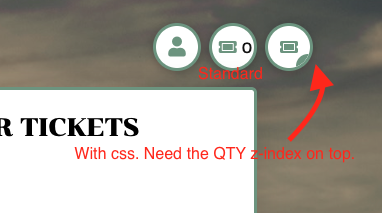
Screenshot 2021-05-20 at 13.12.02

  • Center element (labelled standard) shows icon + text (using cart qty).
  • Last element is a duplicate for explanation here.
  • I have styled the anchor text per previous post.
  • Issue is the QTY (0) is being hidden behind the element.

I am looking for something like…

Screenshot 2021-05-20 at 13.12.02
*mocked up in photoshop

Hope that explains things :slightly_smiling_face:

Hello @kademcconville,

Please remove the previous CSS code and add this code under X/Pro —>Theme Option —>CSS.

.e79-34.x-anchor{overflow: initial;}
.e79-34.x-anchor .x-anchor-content {
    overflow: initial;
}
.e79-34 .x-anchor-text {
    position: absolute;
    background: #7b9e89;
    border-radius: 100em;
    width: 1.5em;
    height: 1.5em;
    text-align: center;
    display: flex;
    justify-content: center;
    align-items: center;
    bottom: -3px;
    right: -16px;
}

The output of this code would be like this

Four-Leaf-Competitions

The purpose of providing the custom CSS to show you how to add CSS code to your site. Writing custom CSS is outside the scope of our theme support. If you need more customization, you need to learn CSS and learn how to use the browser’s element inspector.

Hope it helps.
Thanks

1 Like

This topic was automatically closed 10 days after the last reply. New replies are no longer allowed.