Cart dropdown align with inline navigation X pro header

Hi,
I’ve build a header in X pro but need to get the cart dropdown element to be inline with the inline navigation.

You can see it here >> https://pureheartboutique.co.uk/homepage/
(although I’ll add a secure note with a login)

The middle container is set to ‘column’ so I can get the image above the navigation but I don’t know how to get the cart dropdown on the same row as the navigation.

Can you help?
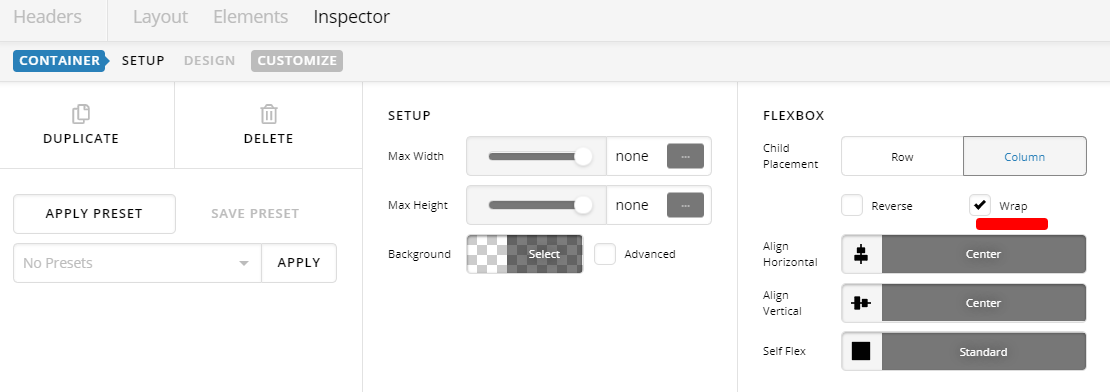
Hi Loren,

To achieve that, please inspect the middle Container. Set Flexbox >Enable WRAP

Then adjust top spacing of cart dropdown to align it properly.

Hope this helps.

Ah, brilliant! Thank you so much!

I now seem to have another problem.

Whilst the back end in Pro shows the custom font and styling, the front end doesn’t. It has all week and has just stopped and I have no idea why.

Can you help?

Hello Loren,

Thanks for updating in!

Your issue occurred because you have added this:

#footerlink {
    color:#000000
}
#footerlink:hover{
    color:#ffffff;

You will need to update this code and use this instead:

#footerlink {
  color:#000000;
}

#footerlink:hover {
    color: #ffffff;
}

I went ahead and change the code already. Please check your site now.

Doh! I’d just missed a closing bracket!

Great spot!! I’d never have found that!

Thank you so much!

You’re always welcome Loren!

Glad @RueNel was able to help you here. Yes, when CSS is not working, it is always a good step to check for CSS syntax error.

This topic was automatically closed 10 days after the last reply. New replies are no longer allowed.