Card elements (new) same height

Hi,

I created these new element cards (that you can see here: https://giacomodenanni.it/), but I couldn’t figure out how to make them at the same height. Can you please help me?

There’s also another issue: when I change some text format in the card (e.g. center alignment), it is showed in the preview of Cornerstone, but not in the browser (still left alignment). I solved it selecting “center alignment” in the column setup. Is this behavior normal?

Thanks!
Hi @skated,

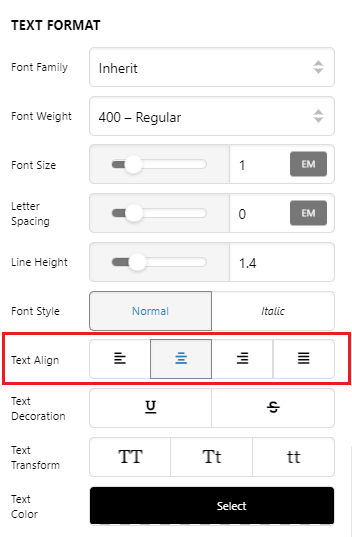
Thank you for reaching out to us. By default the alignment is set to center in the card element, add the following code in the Element CSS of the card element

$el .x-card-face {
  align-items: normal;
}

Then adjust the text alignment as you need (see screenshot)

For the same height, please add the following code in the Theme Options > CSS:

.x-card {
    height: 100%;
}

Don’t forget to clear all caches including your browser’s cache after adding the code. Let us know how this goes!

Thank you @Nabeel,

the directions about the same height worked.

The others about text alignment didn’t. I manage it setting the row alignment as I like and then also text in the card did the same.
I noticed that the text alignment didn’t work anymore for other headline with h1, h2… tag & style. Is it possibile that it is due to my deleting of .h-responsive selector in the settings?

Thanks again

Hi Giacomo,

Sorry, but we can’t see the issue by just inspecting the frontend. It could a caching related, please clear your caching plugins and browser’s cache before you preview the site.

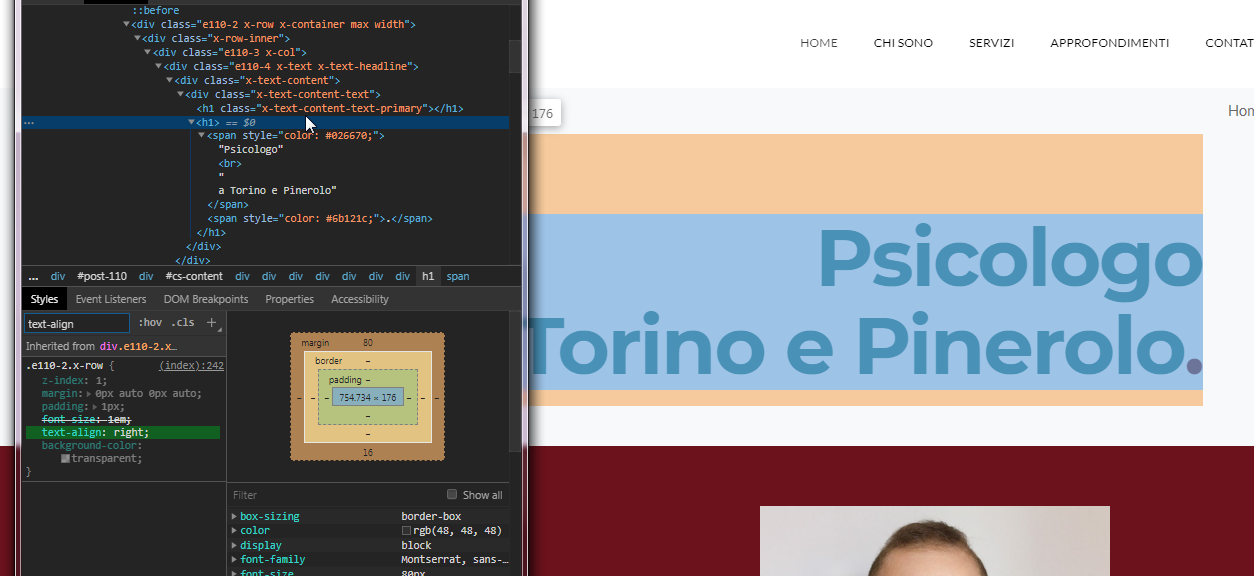
One issue I notice though (could be related to your alignment issue) is you’re wrapping your headline manually with tag and that cause a markup issue on the frontend.

Take a look on this example, this headline is set as H1, but you hardcoded even more h1 tag in its content. So if you take a look on the screenshot, your hardcoded H1 is outside of the generated H1 which has all the styling, that is why your H1 did not get all the styling.


I advise that you enable the Advance Mode, and this should show you all the available settings on the element, with this you don’t need to hardcode styling and markup anymore.

Hope it helps,
Cheers!

This topic was automatically closed 10 days after the last reply. New replies are no longer allowed.