Can't Locate Classes Created in Older Version Cornerstone

Hi All,

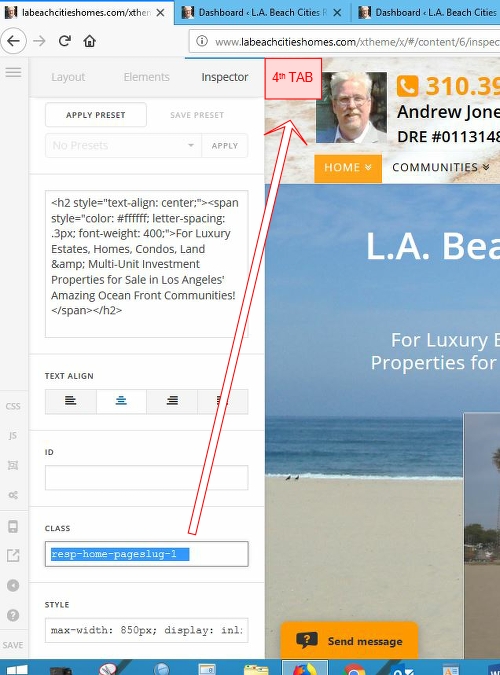
This may be a bone-head question… but I modified the responsiveness of my headlines (and some other text elements) in an older version of Cornerstone and now I can’t find the location of the classes that were made. If memory serves they were originally created and stored on the same page under a fourth tab that no longer exists in Cornerstone.

Everything works fine so I’m guessing they’re in there somewhere… I just can’t find them.
Hello @ajonesx,

Thanks for asking. :slight_smile:

You can get to the class section of an element under Customize button. To make it easier for you, I have recorded a screencast that you have take a look. https://cloudup.com/cO4GxEf0Nkd

Thanks.

Hi All,

I think you missed the point lol… I already know about the class assignment box at the bottom of the various elements (you can see it clearly highlighted on the image attached to my topic post.)

What I’m saying is that the parameters defining the class shown in the image (i.e. ‘resp-home-pageslug-1’) were originally created on the same page inside a 4th tab which no longer exists in Cornerstone (please refer to the image above again.) In this case the parameters defined the maximum and minimum font sizes for that class so they resized properly.

Where are the parameters defining this class located inside the X Theme now… I can’t find them anymore in the new version of Cornerstone because the 4th tab that they were created inside of is now gone?

Hi,

Please see screenshot

This topic was automatically closed 10 days after the last reply. New replies are no longer allowed.