I recently had an issue loading pages in Cornerstone where I would just get the spinning red loading icon and it turned out to be an issue with a bad tag in a global block (see: https://theme.co/apex/forum/t/cant-edit-a-page-wont-load/42165/8). However, I’m getting this problem again on the page included in the secure note and I cannot figure out why.
Hi There,
Thanks for writing in and the details!
The issue was due to the text element with HTML tag. You had no space between the text and the HTML tag so it’s considered as an invalid markup.
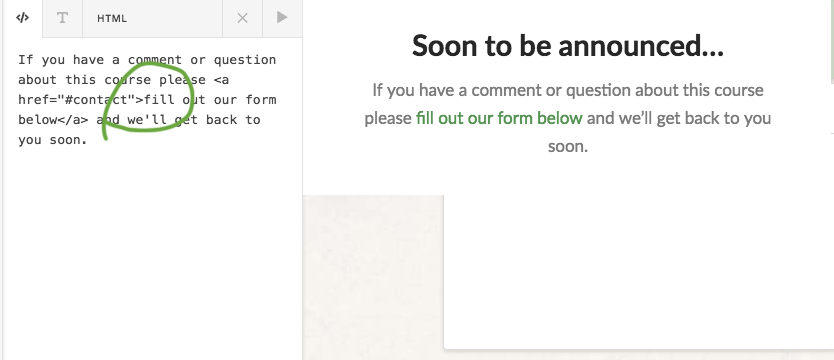
When I gave space between them the page is working fine.
Please check and let me know.
Thanks
I am still getting the same error. I even removed all the text from that element, saved, and cleared cache. Same error.
Also disabled all plugins, cleared cache and still get the error.
Hi There,
Thanks again for writing in!
I can edit and save your page without any error.
Please check your browser cache or you can check in a different browser.
Thanks
I can also edit and save, but not everything is loading and it’s showing the red loading error on the bottom right. There are elements that aren’t being loaded at all above the “APRIL 15 — 21, 2018”. I tried in safari also, same results.
Hi There @threeoten
Can you try purging your server cache, disable your caching plugin temporarily and then increase PHP max script execution time by following this guide (https://www.simplified.guide/php/increase-max-execution-time).
After increasing max script execution time, try testing your issue again.
Let us know how it goes.
Thanks!
I added php_value max_execution_time 300 to the htaccess file, cleared caches, disabled W3 cache, tried 2 browsers, same problem.
Seems like it had something to do with a tag in the first classic custom headline element. I was using it to break the text where I wanted it to break. Why would the br tag be a problem? It caused the element not to lead in the visual page preview and also caused the spinning red loading icon.
Hi There,
Yes, regarding <br> or <hr> tag inside Classic Custom Headline element causing that issue. Sorry if you’re having that issue, that is actually a confirm bug, and its already on our bug tracker.
The workaround would be to use the (new) Headline element.
You can check our Changelog page when we release an update to see if a fix on this bug is included.
Thank you for understanding,
This topic was automatically closed 10 days after the last reply. New replies are no longer allowed.