Hi! We are unable to find a way to link our accordion items in Cornerstone using the newer accordion element so that when one link is opened, the other closes. Can you tell me where this setting is now?
Thank you!
Hi! We are unable to find a way to link our accordion items in Cornerstone using the newer accordion element so that when one link is opened, the other closes. Can you tell me where this setting is now?
Thank you!
Click on the accordian as a whole and in the sidebar you’ll see the list of your accordian items. Below that is the ‘Setup’ section where you can turn on ‘Enable Grouping’ and this will mean that only one is ever open at a time. 
P.S. these are instructions for Pro btw.
Thank you. I don’t have Pro, but always had the option to link items until now. I don’t see “Enable Grouping” or “Link Items” or anything that allows grouping since the update. Am I missing something?
Here’s what it looks like in my X site https://www.dropbox.com/s/gtylrjrzc5aa644/test.png?dl=0 If you don’t see the stuff on the left then perhaps you’ve not completed the update correctly?
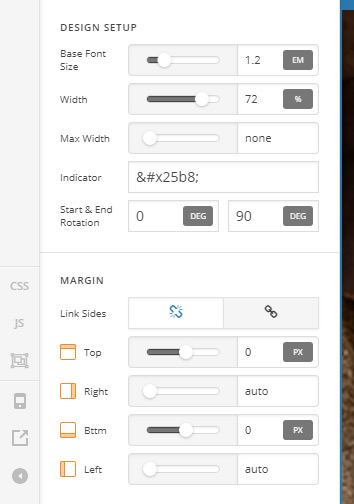
I don’t see the Enable Grouping option. Here is what I see.
Hmm - I recall the update mentioning that they were making it possible to have advanced and basic controls. So perhaps it’s only showing you the basic version of those controls and the setting you want is in the advanced controls? See X > Settings to change this I think. There’s mention of it here https://theme.co/changelog/
Yeesh! That was it! I should have thought to check there first! Thank you so much for your help! 
