Can't Install Design Cloud Templates

I searched through the forum and found similar issues. I followed all of the advice given in there but, no joy. I am trying to install architecture portfolio.

I have disabled plugins, increase file size (64MB), and max time (600).

Is there another way to install the templates?

Hi @timdumas,

Thanks for sharing all the info above. Based on your server info I don’t see any reason why they wouldn’t import. Logging in would be helpful to see the problem in action. I tried the credentials you included, but I can’t access design cloud. Would you mind making that account a site administrator, at least until we can sort this out? Thanks!

Alexander,

Arggg… Sorry I thought I had selected administrator when I created the account. That is now fixed.

I also, tried logging out and back like you suggested, no glory.

Thank you for your time and consideration,
Tim

Hello Tim,

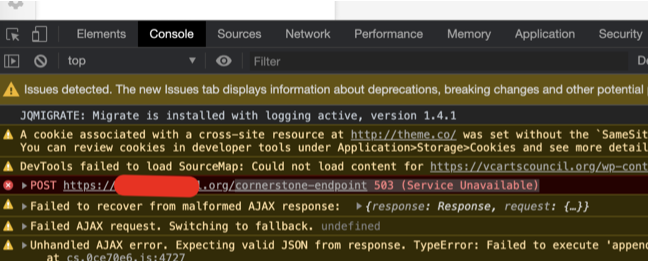
Thanks for that. We have logged in and investigated the issue. When you import the Architecture Portfolio page template, there is a JS error on the console.

0SHd2TfpQ0eFDkVeSgWUGg

Can you please contact your hosting providing and ask them to temporarily disable your ModSecurity? You may need to whitelist Cornerstone-endpoint as well.

Kindly let us know how it goes.

Thank you!

You are most welcome!

This topic was automatically closed 10 days after the last reply. New replies are no longer allowed.