Hello,
I cannot figure out how to get my sidebar to appear on my homepage. It appears on all other pages. It used to appear on homepage.
Hey Pat,
Thanks for writing in!
There was an issue with one of your iframes. You added this in posts 2229:
<iframe width="560" height="315" src='https://www.youtube.com/embed/sP5mepLMSTc" frameborder="0" allow="accelerometer; autoplay; encrypted-media; gyroscope; picture-in-picture" allowfullscreen></iframe>
The correct one should be this:
<iframe width="560" height="315" src="https://www.youtube.com/embed/sP5mepLMSTc" frameborder="0" allow="accelerometer; autoplay; encrypted-media; gyroscope; picture-in-picture" allowfullscreen></iframe>
They may look the same but they are not. You miss one quote which created an issue. And your sidebar is not displaying because there is no widgets assigned to your Main Sidebar.
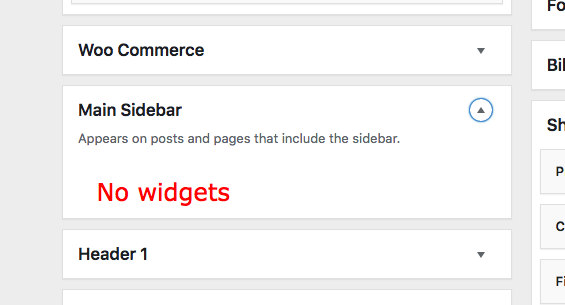
I can see that you have created several sidebars. If you want on these sidebars to appear in your homepage, you must make sure that you assign them to your homepage.
Hope this helps.
Got it.
How do I get the Main Sidebar to show up on posts pages?
Hey Pat,
By default the Main Sidebar should be displayed on all posts and pages that includes the sidebar. Are you referring to the single posts? I checked your setup and you’ve WooSidebars plugin installed which is overriding the Main Sidebar on single posts, deactivating the WooSidebars plugin should fix the issue.
Hope this helps!
This topic was automatically closed 10 days after the last reply. New replies are no longer allowed.