I’ve tried some of the solutions in the forum and they aren’t working. I’ve enabled font manager and changed the font on that end and the theme end but it isn’t working. It works somewhat on my live site Alliancvideos.com as you can see in the first headline, but not on my draft page -https://alliancevideos.com/x/#/content/1317
Hello @CoreyKlinefelter,
Thanks for writing in!
I have logged in and checked your page. You have inserted a headline with a blank text and only the sub headline text is displayed.
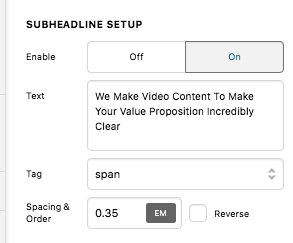
I have compared the preview and the live page. They look the same on my browser.

And since you have installed WP Fastest Cache, please clear your plugin cache before testing your site. This can cause the changes to not take place on the front end. It will eventually show up when the cache regenerates, but it’s not ideal if you’re looking to see your changes immediately. Caching plugins are best to turn on only when you’ve finished building the site.
Hope this helps.
I do appreciate the advice, however that isn’t the page with this issue. The page with the issue is https://alliancevideos.com/x/#/content/1317
It’s the Home draft page. The headlines will not change font. I have cleared the cache and deactivated the plug-in however it’s still not helping.
If I add the text element and change the font that way it works. But the headline element will not change the font.
Hello @CoreyKlinefelter,
I have investigated your issue and I found out that you have installed a 3rd party plugin, Font Organizer. This plugin is overriding the Cornerstone elements especially the headline element.
Please disable Font Organizer plugin.
This topic was automatically closed 10 days after the last reply. New replies are no longer allowed.