Can't get blog post full width in Pro

Hi there,
Did a search, tried all the suggested css codes and adjusted everything to full-width in theme options but still cannot get my post to be full width like a page. There’s still a container/padding around the sides.

https://www.labyrinthofenchantment.com/june-symbolism-post/

Please advise, thank you!
Hi there,

Thanks for writing in. Even with a full width template There will be container and padding around the sides which matches the 88% you set for your site width in Theme Options. It is however possible to override this with a little custom CSS. This should remove containers on the blog for you:

.blog .x-container.width {
    width: 100%;
}

Hi there, tried this and it didn’t work…

Hello @rotipom,

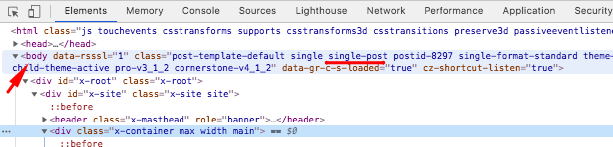
The code given by @Alexander is meant for the blog index. If you want to apply it to the single blog post, you will have to use this:

.single-post .x-container.width {
    width: 100%;
}

You need to use the Google Chrome Developer Toolbar to check the live HTML code and find the CSS selector used in the code was attached to the body element.
XHhNnhYnTqar8hy4bQJl-g

Here are some related links for further reading, this could help you in finding and implementing some CSS fixes:

We would love to know if this has worked for you. Thank you.

This topic was automatically closed 10 days after the last reply. New replies are no longer allowed.