Can't Find Some of the elements

Hi,
Despite having a great hype of your theme its just lacks most of the basic things. Old versions of your theme editor was still a little helpful but this new interface is just awful.
I just can’t even see the elements in the editor which are visible on the frontend.
I hardly managed to apply the custom header that I just made but there are some frontend elements that I can’t find in the editor.
I just installed a demo and can’t find out the elements in the editor to change. I want to remove the element I have mentioned in the screenshot below and want to make the header to populate throughout the entire width.
Please have a look: https://prnt.sc/1qaqpjj
here is the editor there I can’t find the element to edit which I have mentioned in the above screenshot.
https://prnt.sc/1qaqsm3

Please provide me a sensible solution for that and any guide where I can find some helpful information using this theme as there is not enough updated info about this theme on internet.

Website Link: http://www.stand.guru/dev/

Thanks

Hi @sandra,

Thanks for reaching out. That logo is positioned using custom CSS, so regretfully it can’t be changed from the builder controls. Could you give us an idea of how you’re expecting it to look? We might be able to advise a way to change it.

It looks like you’ve got Under Construction active on your side. Would you mind adding a Secure Note to your post and sharing login information so we can access your URL?

Thank you!

Hi,
I know that thing is some kind of custom work which I am unable to find.

I just want to remove that section on the left on entire website and want the header and the rest of the content to be centered after getting rid of this thing.

Hello @sandra,

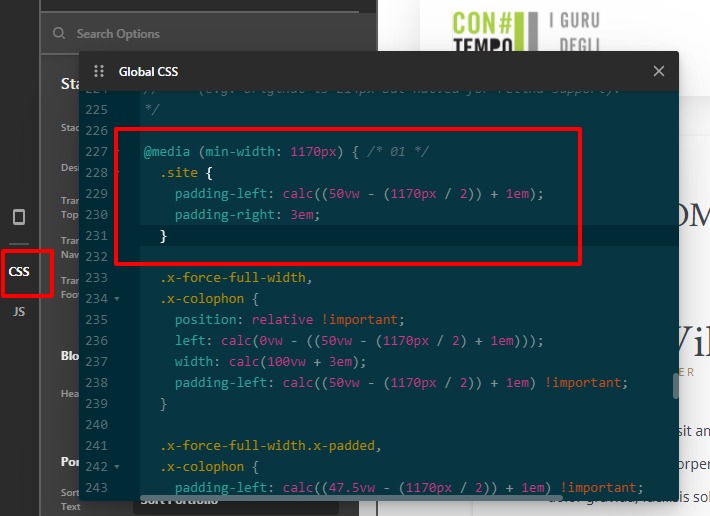
It might be coming from the demo-specific custom CSS code, to remove that you need to go to Pro—>Theme Options—>CSS.

Please have a look at the given screenshot below.

Hope it helps
Thanks

Sorry but removing the above mentioned code even worsen the things. I just don’t to use the vertical logos on the right side and want to website layout to be 100%.

There aren’t enough good demo site templates with this theme and I found only the current one a little sensible but it seems its just beyond the scope of using Wordpress. Even custom coding a website is easier than understanding this theme. I am really disappointed with the new interface of this theme and the content it provides with that price points isn’t justifiable at all.
Please provide me a guide if there is any but I don’t think so otherwise I would prefer to use another theme may be some of the free themes with far more capabilities than this overly complex theme.

Also I am unable to install cornerstone in this theme. It gives error on activating it.

Hi Sandra,

Sorry for the trouble, I did go ahead and remove all the Custom CSS and Element CSS to restore the page template to its native look. You can edit the page now without worrying about the custom CSS.

I leave a couple of lines of CSS on the Theme Options > CSS and that is to make the footer look fullwidth.

Please understand that the left-side white space is a big part of the Lawyer Demo design, removing that side means removing all the adjustments made to all the elements. It was done this way because this demo was built prior to the release of Header Builder (PRO).

Pro users have Cornerstone built into the theme, so there is no need to install the Cornerstone plugin if you’re using PRO.

Hope this helps,
Cheers!

This topic was automatically closed 10 days after the last reply. New replies are no longer allowed.