Hi, please see the issue here:
Hi @threeoten,
Thank you for reaching out to us. We have a video explaining the Row here https://youtu.be/6pN_a4eD5NM which will help you in understanding the mechanics of how it works.
The issue you’re having is for example when you select 1 column layout and change the layout to 2 columns (50-50) you’re not adding the other column. You need to add the second column as well because initially when you selected 1 column layout, only one column was added and now you’ve selected 2 column layout you should add another column to make it actual 2 columns layout (see screenshot)
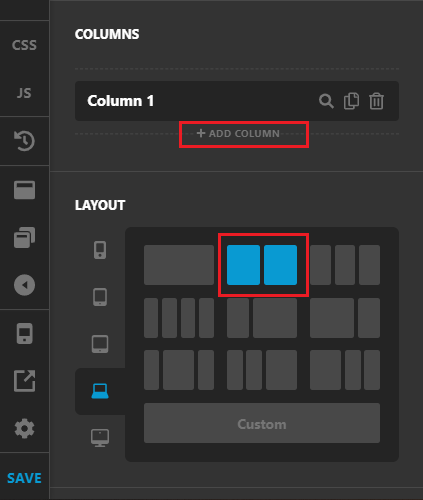
After clicking on Add Column button, you will have 2 columns at 50-50 layout (see screenshot)

Please watch the video tutorial as well to learn more about the Row element. Also checkout our YouTube channel here for more tutorials https://www.youtube.com/channel/UCgY5E3tOI83kBEahh9Y3uRg
Hope this helps!
This topic was automatically closed 10 days after the last reply. New replies are no longer allowed.