Because when I do, I get 2 footers so have had to revert to the previous version of the theme for now.
Is there a reason that 2 footers are output when I change the name of the theme?
Thanks
Because when I do, I get 2 footers so have had to revert to the previous version of the theme for now.
Is there a reason that 2 footers are output when I change the name of the theme?
Thanks
Hey @tablufc88,
I’m sorry but I’m not sure what exactly is the issue. Also, you must not change the of Pro parent. Only the child theme can be changed. Would you mind providing the steps for us to replicate on our test site?
Thanks.
Hello,
When I change the theme name of “Pro” in the folder & style.css as I always have done it displays 2 footers. Here are the steps:
Hope this explains the issue.
Hey @tablufc88,
The parent Pro theme wp-content/themes/pro must not be changed. I’m not sure why it worked for you before but that is not a standard practice and we do not support issues arising from that customization.
You can change the theme name of the child theme to anything. You only need to leave the Template to pro.
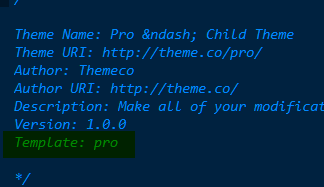
Thanks.
This topic was automatically closed 10 days after the last reply. New replies are no longer allowed.