Can't Center Certain Sections

There are several sections of my homepage that I cannot figure out how to center.

  1. Below the video there are three square photos that are shifted left. I’d like those centered but can’t figure out how.

  2. Toward the bottom there is a header that says “Awards” that I’d like centered

  3. The footer I have is a Global Block that says “Want to Talk” and has a contact form, I’d like that to be centered as well.

I’ve messed around in all the settings and nothing seems to be working. Any suggestions?
Hello Brock,

Thanks for writing in!

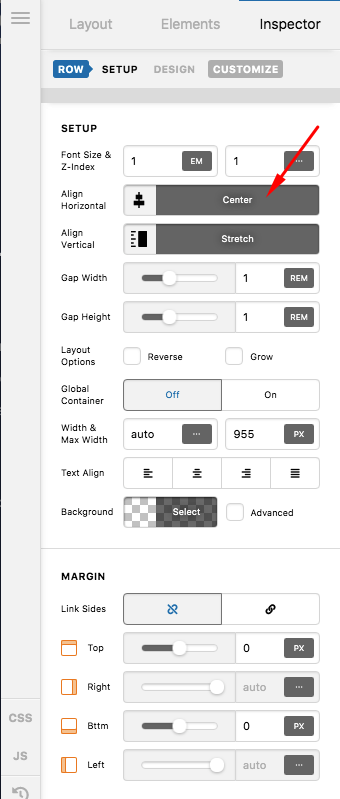
1.) Please check the row settings. There could be a negative left or right margin. Check the Flexbox layout too.

2.) The same goes here like in #1.

3.) Please edit your global block and make sure that in the row settings, the flexbox layout is set to be centered.

If nothing is helping, provide us access to your site so that we can check your settings. Please create a secure note with the following info:
– Link to your site
– WordPress Admin username / password

To know how to create a secure note, please check this out: https://theme.co/apex/forum/t/how-to-get-support/288

Regards.

Thanks! There was a little piece of code in the CSS on those rows that I missed.

The only issue I’m having now is the footer (global block) at the bottom - I can’t seem to figure out how to center that. Any suggestions?

Hey Brock,

Please add this code in X > Theme Options > CSS:

.site .x-colophon.top {
    padding-left: 0 !important;
    left: 0 !important;
    width: 100% !important;
}

Then edit the Footer v2 Global block and edit each row setting and go to the row’s element CSS and remove this block of code:


$el {
  margin-left: 0 !important;
}

Hope this helps.

Perfect! Thanks so much!

You are most welcome!

This topic was automatically closed 10 days after the last reply. New replies are no longer allowed.