Can't Add Space between columns, need help

Hello, I’ve tried for hours to add space/padding between my 3-columns within a row, when using Pro content builder… can you please tell me how to do this…? I’ve tried adjusting the padding on the section, row, and columns…but when I add padding in the individual column, it just makes the column longer. Here’s a screenshot of my problem…and a link to the test page…thank you for any help.

http://needtosellahomefast.com/test-homepage/
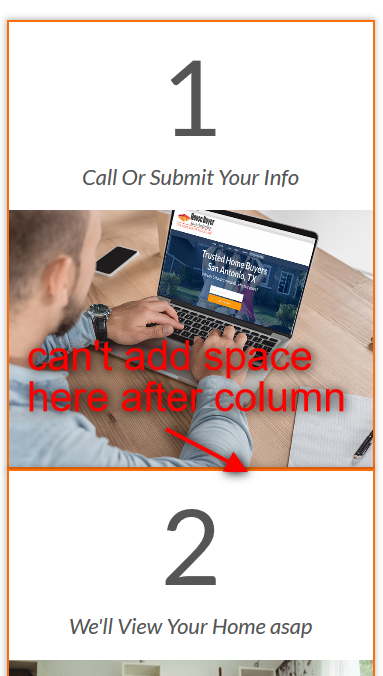
actually, just got it…I added this code to the element css area:

$el{
margin-bottom:1.0em;}

Hi There,

Sorry for the delay, yes that will work. You can wrap it with a @media query so it only apply on mobile and not on desktop view.

@media (max-width: 767px) {
	$el {
		margin-bottom: 1em;
	}
}

Cheers!

Is there any solution, to have this margin generally added to all columns in mobile view? Or even better: to all columns but the last?

Hi there,

You can do it using this code:

@media(max-width: 767px) {
    .x-container .x-column:not(:last-child) {
        margin-bottom: 1.2em;
    }
}

Please check these links to the references of the code above:
https://www.w3schools.com/css/css_rwd_mediaqueries.asp
https://www.w3schools.com/css/css_margin.asp
https://www.w3schools.com/cssref/sel_not.asp
https://www.w3schools.com/cssref/sel_last-child.asp

Hope this helps.

Perfect, works!

Thank you!

Uli

You’re welcome.

This topic was automatically closed 10 days after the last reply. New replies are no longer allowed.