Hello, when I try to return to a published Post to edit, and I click Edit in Cornerstone, the page comes up in HTML text. \
Hi there,
It seems to be a corrupt installation or a problem regarding the permalinks. Please follow up the troubleshooting steps below:
- If you’re using a CDN, please clear the CDN’s cache and disable optimization services.
- Test for a plugin conflict. You can do this by deactivating all third-party plugins, and see if the problem remains. If it’s fixed, you’ll know a plugin caused the problem, and you can narrow down which one by reactivating them one at a time.
- Remove custom CSS and Javascript from the options or Child Theme and test the case.
- Reset your htaccess file by renaming it to
.htaccess-bak. Then in WP Admin Menu, go to Settings > Permalinks and just click the Save Changes button. - Increase the PHP Memory Limit of your server. Click here for more detailed information and how to increase the PHP memory limit.
I also want to insist that the usage of the minification tools and cache tools such as WP-Rocket and Page Speed might be the cause. All the assets of the Cornerstone and the Theme are minified out of the box, and plugins like the ones I mentioned should not attempt to minify them again. You either need to avoid using such plugins or exclude the Theme and Cornerstone Javascript and CSS files from minification on the plugin settings.
Thank you.
Thank you for your excellent analysis and suggestions.
We can open and edit in Cornerstone. However there is a strange overlapping of layers in edit mode that I would like for you to take a look at. See Screenshot, far upper left corner.
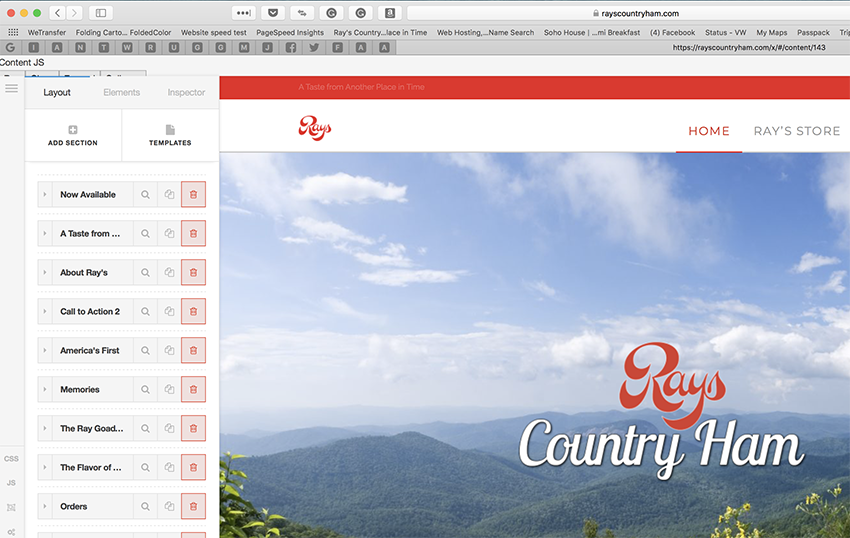
Hi,
I checked and it seems to work fine on my end.

Try to clear browser cache and check again.
Thanks
This topic was automatically closed 10 days after the last reply. New replies are no longer allowed.