Can the single slider be displayed straight away on page without a delay?

Hi, I’ve done a slider on a home page and it’s all fine, and for the other pages I’ve used a single slider without any transitions and I just want to use it as a header image, but there’s delay in it loading on the pages. you can see the other page content and then a few seconds after the slider loads on screen! Is there a way of it instantly being there with the other content without any delay?

I’ll put the URL in a secure note as it’s being built on a temporary link.

Thanks!

Hi there,

Since it is only one image you have placed in the header area, you might want to consider setting the image as a section background instead then placing the slider text in the section content. That way, the page will have less resources to load since Revolution Slider needs to load additional JS and CSS files.

Hope this helps.

The thing with that is though, in Rev Slider I’ve put in the faded black bar at the bottom of each image as a layer and I won’t be able to do that will I if I just have it as a section background?

Cheers

Hi There @core365

When you add a background image to the lower background layer, you can set a transparent color through background upper layer. Please refer to the screenshot below and see if that suits your requirement.

Thanks!

Hi, I know about setting a transparent background colour, I’ve used it on other images on the same page! I need a graduated transparent effect from solid black to transparent that’s only about 1 inch high - that’s why I did it as a slider. If there isn’t a way you know of that loads the slider without a delay, then please let me know as it doesn’t look like there are other options of creating this without using Photoshop to change the actual image.

Thanks

Hi @core365,

The slider will always load with a delay as it needs to download the resources and dependencies for it to work.

Instead, what you can do is achieve it through Darshana’s recommendation plus a bit of custom CSS. Example, make sure to add the background color to the upper layer (it will serve as a placeholder, it doesn’t matter what color you choose). Then add this CSS to your section or row’s Element CSS.

$el .x-bg-layer-upper-color {
/* Permalink - use to edit and share this gradient: http://colorzilla.com/gradient-editor/#000000+0,000000+100&1+0,0+54 */
background: -moz-linear-gradient(top, rgba(0,0,0,1) 0%, rgba(0,0,0,0) 54%, rgba(0,0,0,0) 100%) !important; /* FF3.6-15 */
background: -webkit-linear-gradient(top, rgba(0,0,0,1) 0%,rgba(0,0,0,0) 54%,rgba(0,0,0,0) 100%)  !important; /* Chrome10-25,Safari5.1-6 */
background: linear-gradient(to bottom, rgba(0,0,0,1) 0%,rgba(0,0,0,0) 54%,rgba(0,0,0,0) 100%) !important; /* W3C, IE10+, FF16+, Chrome26+, Opera12+, Safari7+ */
filter: progid:DXImageTransform.Microsoft.gradient( startColorstr='#000000', endColorstr='#00000000',GradientType=0 ) !important; /* IE6-9 */
}

I use this tool to create that gradient style, http://www.colorzilla.com/gradient-editor/. Then I just added !important to make sure it overrides the color you have added through the inspector.
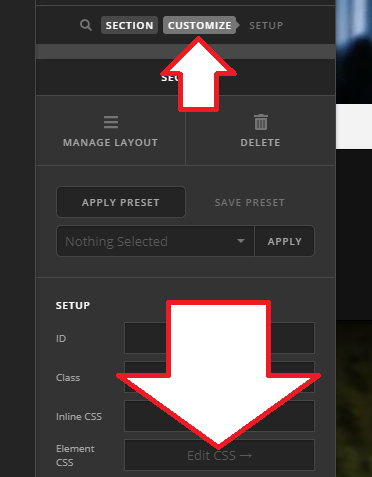
Thanks!

Hi, that’s great, thanks for explaining how to achieve the gradient on the background image, I’ll give it a go!

Cheers

You’re welcome! :slight_smile:

This topic was automatically closed 10 days after the last reply. New replies are no longer allowed.