Can Not logout/or get to dashboard/no access to my WP site

Well, I got myself locked out of my site.

I removed a plugin that was not working as it was supposed to and
apparently left a snippet of it’s code on my logout page.
When I went to log out I got a oops and 404 and no access to my site through any doorway.

I have done all I know to do including replacing the .php file for login/logout

This is the snippet of code.

LogOut


Click The (X) To LogOut

[pms-logout text=”” link_text=”X” redirect_url=”http://mountains.milestones.legendoflamarvalley.com/”]
 

The pms plugin was the one I deleted.

Any workaround to this disaster?

Blessings,

Jann

I finally did a restore and got back into my site.
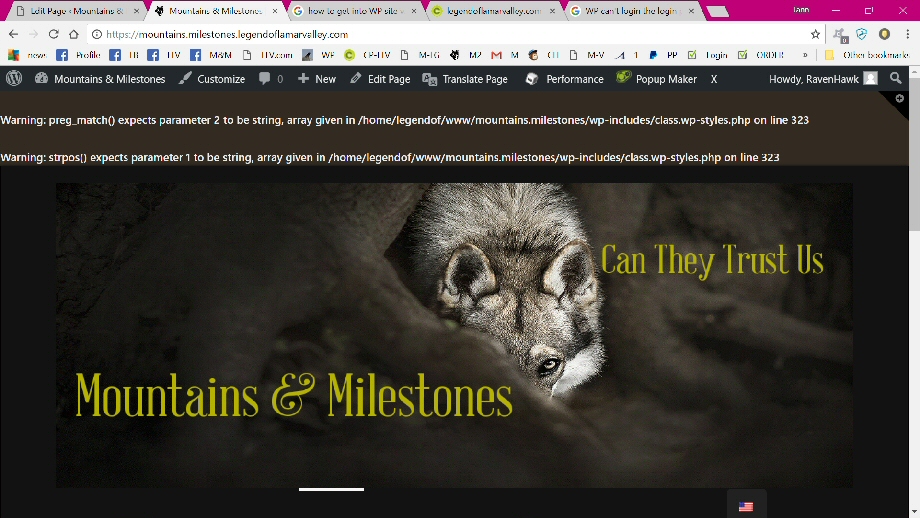
The plugin I deleted was restored and the login page and logout page have the same warning string across the top of them.

Warning: preg_match() expects parameter 2 to be string, array given in /home/legendof/www/mountains.milestones/wp-includes/class.wp-styles.php on line 323

Warning: strpos() expects parameter 1 to be string, array given in /home/legendof/www/mountains.milestones/wp-includes/class.wp-styles.php on line 323

Line 323 states
if ( !is_bool($src) && !preg_match(’|^(https?:)?//|’, $src) && ! ( $this->content_url && 0 === strpos($src, $this->content_url) ) ) {

I do not know php so I have no clue what this is about.
How can it be fixed?

I removed all the plugins shortcodes for their place on the login/logout pages now.
All that is on both pages is the logo.

I want to remove the plugin from my site and replace with what will work.

  1. can I uninstall it now?
  2. what do I have to put on the two pages for them to work?
  3. What do I do to redirect users to the home page after login, just a redirect a href?
  4. To logout by clicking on the X to do so? How can that be done?

I really need some direction if possible.

Blessings,

Jann
Hi @webbjann,

Thanks for reaching out.

The warnings will appear if you DEBUG is active. Please set WP_DEBUG to false in your site’s wp-config.php and it will disable the warnings.

  1. Yes, you can uninstall it and use new one
  2. I’m not sure what you’re trying to do with the two pages, but if it’s related to that plugin then I recommend contacting the plugin author.
  3. Do you use custom form, or plugin? If it’s a plugin then please contact the plugin author. If it’s a custom login page that uses standard login form then please try this https://wordpress.stackexchange.com/questions/257150/code-to-create-a-redirection-after-login, you may enhance it to your preference but we can’t cover code customization.
  4. You’ll have to call the logout URL of your site, an example here https://codex.wordpress.org/Function_Reference/wp_logout_url

But based on your initial code, it’s more related to the shortcode so it’s still best to contact the plugin author.

Thanks!

This topic was automatically closed 10 days after the last reply. New replies are no longer allowed.