Can not change the background colour of a section in Cornerstone

Good morning,

I am currently building a new site with the latest X release. If I try and change the background colour in Chrome the panel looks very odd and you cannot interact with it - see screenshot:
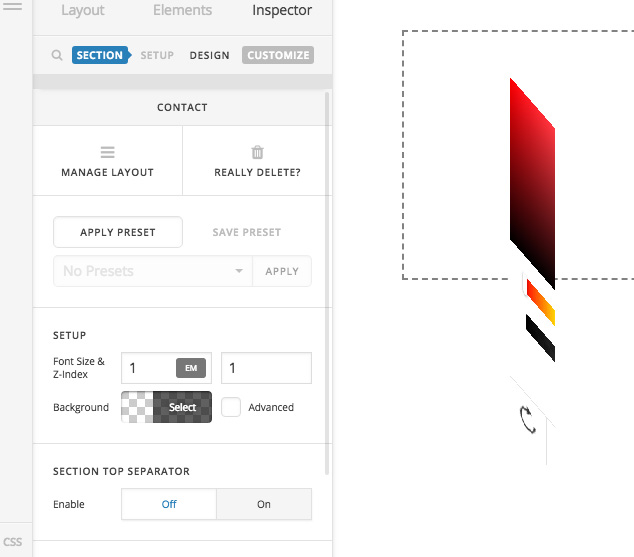
As a temp fix I am adding the colours using CSS but I would not like to do this in the long term

Login details in Secure note

Thank you,
Jason

Hello @hyperdrive_boom,

Thanks for asking. :slight_smile:

I created a test page and tried checking section background colors. I don’t see the problem on my end and it’s working fine. Please see screencast. https://cloudup.com/cl_5s-9oeIl

Can you please clear browser cache and try again?

Thanks.

Good morning,

it seemed of happen on new versions of the cornerstone back offices since I got the latest Chrome on the Mac (Version 65.0.3325.162 ) - I have done hard refreshes and cleared browser cash with no luck.

I just tried a old one (Version 2.0.6) and can change the colours fine

Please advise

Thank you!

Hi There,

I have created a test page on your site on Mac using Chrome browser, but I could not experience this issue (see secure note).

Could you please try clearing your browser cache and re-test this issue again.

Thanks!

Thank you for this!

How odd, cleared cache, removed all extensions (only had 2 anyway) and I still get the same error.

If I if I try it on Safari works fine and older versions of Cornerstone it works too. The one you are checking is the latest but I also have a Pro site which is not the latest (1.2.7) with the same colour error

Jason

Hi Jason,

That’s very strange but it seems to be a caching related issue. Is it possible to provide login credentials for the other site that you have mentioned ? so that we can check it as well. Make sure to use the secure note option when submitting your credentials.

Just double checked my chrome version and it’s the same version as yours 65.0.3325.162 (Official Build) (64-bit).

Thanks!

This topic was automatically closed 10 days after the last reply. New replies are no longer allowed.