Can all pages start under navbar and logobar, at the minute, apart from the Home page, the content is behind it!

Hi, I’m working on a site, and with your help, the Home page is looking how I want it, but can all the other pages start under the navbar, as at the minute the content starts at the very top of the page and you can’t see it as it’s behind the navbar!

http://www.bodyandmindtherapies.net/testimonials/

Thanks!

Hi there,

Please add this code in X > Theme Options > CSS:

.x-main.full {
    margin-top: 265px;
}

Hope this helps.

Brilliant, that sorted it! Thanks!

You are most welcome. :slight_smile:

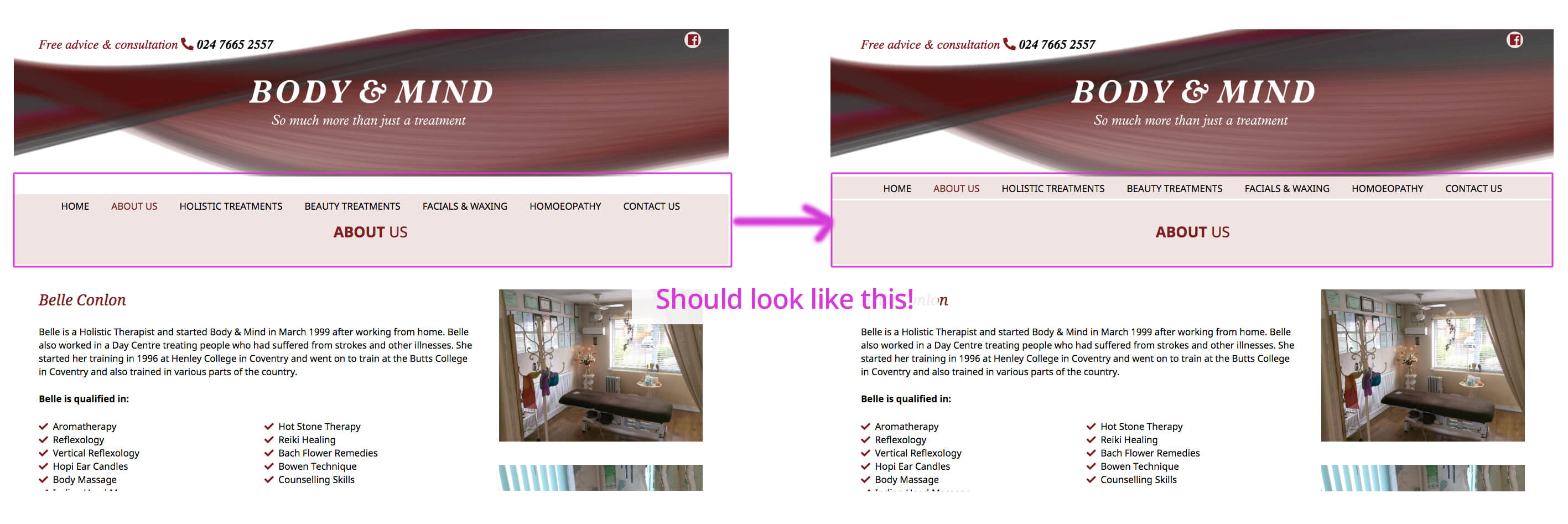
Hi, I thought the issue had been solved, but now when you first click on a page, the navbar and page title aren\t showing in the correct position, it’s as though they’ve dropped further down than they should, but when you scroll down the page and back up to the top, it then displays as it should do! I’ve included a marked up screen grab for your reference - the one on the left is what you see when you first click on a page and the one on the right is how it should look!
http://www.bodyandmindtherapies.net/about-us/

Also, on the Home page, under the slider there’s a big white gap that shouldn’t be there!
http://www.bodyandmindtherapies.net

Thanks!
Hi There,

Please update the previous CSS to this:

body:not(.home) .x-main.full {
    margin-top: 265px;
}

After that navigate to Theme Options > Headers > LINKS – TEXT > NAVBAR FONT SIZE (PX) > change to 16:

Hope it helps :slight_smile:

That’s sorted it all out! Thank you!

Cheers!

You’re most welcome!

This topic was automatically closed 10 days after the last reply. New replies are no longer allowed.