Buttons & Social Icons issue in builder

Is there a way to select a button or social icon in Cornerstone that doesn’t trigger the link.

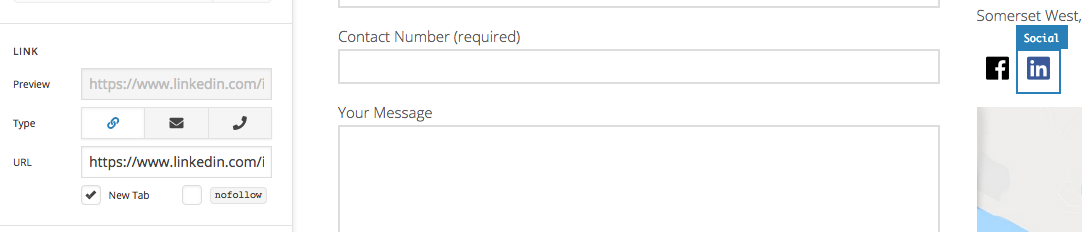
Every time I try to select a social icon or button element to adjust the settings it opens the link in a new tab and takes the focus to the new tab. This makes it extremely difficult to edit the elements settings without wasting time having to go back to the current tab.

Currently using X 6.2.5, WordPress 4.9.7. This happens in both the latest Chrome & Firefox browsers.
Hi @urchindesign,

Thanks for reaching out.

I checked on my installation and I can’t reproduce this issue on buttons and icons, perhaps you’re referring to share element? And please provide a video recording.

Thanks!

I am honestly not going to make a video. Please use the details supplied and review for yourself.

Edit the contact page with Cornerstone and click on either the download button or social icons to see that it opens the link instead of just allowing me to edit the element.

This happens on Windows with both Chrome and Firefox.

Hi There @urchindesign

If you click on the icon, it will open in a new tab. But if you click on the outer circle, you should be able to edit the element.

However I see this editing procedure needs to be improved, so I will forward this to our developers to review further.

Thanks!

This is also a massive problem for me. I can’t select a button in cornerstone without it launching the link in a new tab. This is especially frustrating with you are trying to get to the CSS section of the button editor - because trying to slide the menu bar to the furthest right section often makes me click the column button instead and kicks me out of the button element.

Hi there,

Our apologies for this. We already added this to our issue tracker so that our developers will be aware of it.

Unfortunately, we cannot provide an ETA when an update for this will be released but you can always check our changelog for updates.

For the meantime, you may switch to Cornerstone in Skeleton Mode then you should be able to click on the Icon element that is linked.

Hope this helps.

This topic was automatically closed 10 days after the last reply. New replies are no longer allowed.