I have selected the flat, square button shape for my site and they are showing rounded.
Hello There,
Please be advised that when you use the classic button elements, all the styling for the classic button elements can be set in X > Launch > Options > Buttons.
When you use the V2 button element, this button will have it’s own default styling which is different from the classic button and is displayed upon inserting the button in to the column.
To change the button to flat, please remove the border radius and box shadow options of your button:
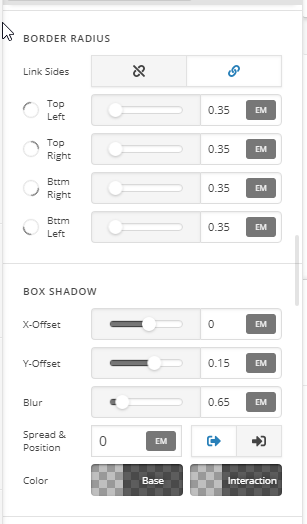
Hope it helps 
Yes it does! thank yo but im not sure where to find that button menu you showed. could you direct me please?
Hi There @nobaku71
My colleague @thai is referring to your Button element in Cornerstone. When you click on your button element, you can access those options.

Hope that’s clear.
yes that was clear. I stumbled on another article that told me to turn on “professinal”(?) i think in the cornerstone settings to enable those settings. otherwise they are hidden. thank you for your help
Hey @nobaku71,
Please go to X > Settings > Permissions > User Preference. You select “Advance Mode” so that all the options in the button settings can be tweak. This is only available in V2 elements though.
If you are using classic buttons, you can change the button default settings in X > Theme Options > Buttons as what @Thai has suggested.
And if ever you are using the button shortcodes, then you’ll have to make sure that you are using the right button type, shape and size. You can check that out here: http://demo.theme.co/integrity-1/shortcodes/buttons/
Hope this helps.
This topic was automatically closed 10 days after the last reply. New replies are no longer allowed.