Hi guys,
How do I achieve this?
I would like the button to sit at 50% of its height on the line.
I have tried margin-bottom:-50%;
But it doesn’t seem to work…

Thanks in advance
Niall
Hi guys,
How do I achieve this?
I would like the button to sit at 50% of its height on the line.
I have tried margin-bottom:-50%;
But it doesn’t seem to work…
Thanks in advance
Niall
Hey Niall,
Based on your screenshot, it seems working or maybe just a few pixels off. That few pixels could be coming from the text above it or something else.
Please post the URL of the page so we could inspect the button and the elements surrounding it.
Thanks.
Hi Christian,
Just so you know, this isn’t my website but a look I would like to replicate 
The URL is https://www.wallertransportservices.co.uk/services/multimodal-logistics/
I am sure Pro can do it easily, I’m just not sure how best to do it.
Thanks for your help!
Hello Niall,
It can be achieved by using custom CSS. For that Go to the cornerstone page builder -->Add a Row in the section —>Add a button element —>You need to add a custom class in the column.
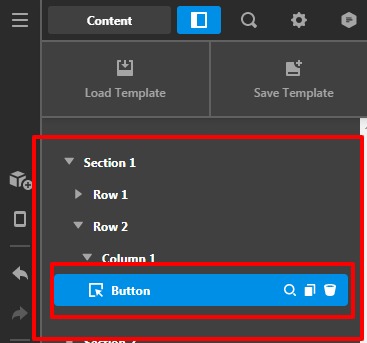
Custom Class in the column
Now add this custom CSS in the Pro—>Theme Option -->CSS
.x-col.center-buttons {
    position: absolute;
    bottom: -25px;
    left: 50%;
    transform: translateX(-50%);
    width: 100%;
    text-align: center;
    z-index: 9;
}
The output would be like this
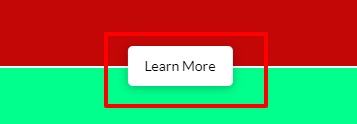
Please feel free to change the custom CSS name. In case if you change the class name you will have to add the changed class in the CSS selector as well.
The purpose of providing the custom CSS to show you how to add CSS code to your site. Writing custom CSS is outside the scope of our theme support. If you need more customization, you need to learn CSS and learn how to use the browser’s element inspector.
Hope it helps.
Thanks
Thank you so much that worked perfectly!
Hello Niall,
Glad that we were able to help you. Please feel free to reach us if you have any queries regarding our theme and theme settings.
Thanks
This topic was automatically closed 10 days after the last reply. New replies are no longer allowed.
