Button cannot be centered

Hi there!
I just created two buttons, one of them has been in the center automatically but the other is on the left and I do not know why? I cannot see any differences in the setup of the two buttons and I don’t know how to get the one that is on the left to the center?
How do I center buttons in general? I am suprised that one is in the center automatically. All I did was copy the first one (which is on the left) and place it in another section and it was in the center.

Thank you!
Hello Vivien,

Thanks for writing in!

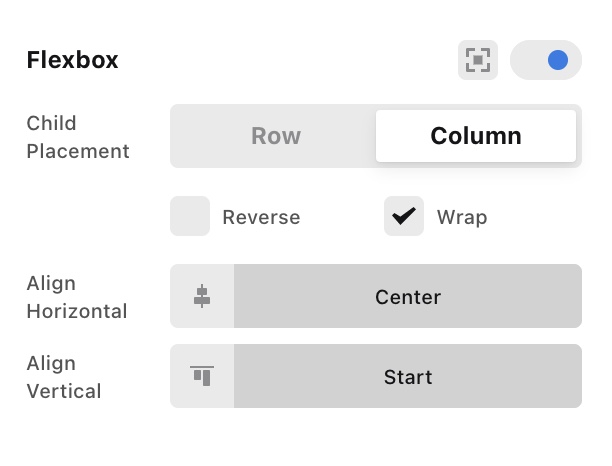
To center your button, please edit the page and click the column. In the column settings, enabled the “Flexbox” option and then set the horizontal alignment to the center.

Screen Shot 2021-03-08 at 8.12.31 AM

Kindly let us know how it goes.

Thank you very much! That helps! :slight_smile:

Hi Vivien,

Glad that we are able to help you.

Thanks

This topic was automatically closed 10 days after the last reply. New replies are no longer allowed.