Hello,
In the past I was able to easily drop buttons to the next line, either by HTML/CSS, or by making it a “block” button, but I don’t see that in the new editor. Any help would be greatly appreciated!
Thank you,
Justin
Hello,
In the past I was able to easily drop buttons to the next line, either by HTML/CSS, or by making it a “block” button, but I don’t see that in the new editor. Any help would be greatly appreciated!
Thank you,
Justin
Hi There,
Please provide us with your website URL so we can take a closer look?
Thanks.
Hello,
I have updated the Secure Notes with the password for the Under Construction plugin and URL.
Thank you
Hi there,
Unfortunately, the Under Construction plugin does not have any place to add the password you have provided.
Anyway, I checked the image you have attached and you can achieve the button per line functionality by going to the customize tab of the button element and add a specific class to it:
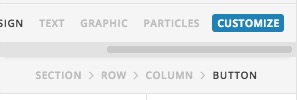
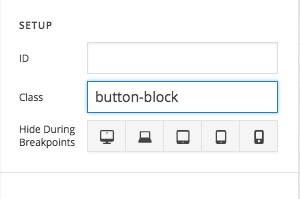
Then you can add the CSS code below to X > Launch > Options > CSS:
.button-block {
  display: block;
}
Then you can adjust the width and margin of the button using the native controls of the button element:
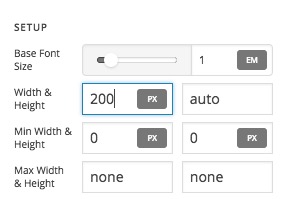
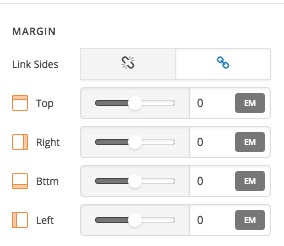
After the steps above you will have the button-block class available for all other buttons if you want to make them per line.
Thank you.
Great that worked out! Thank you for your help!
Perfect! Glad that we could be of a help 
This topic was automatically closed 10 days after the last reply. New replies are no longer allowed.