Bulk save the pages with X-theme/Cornerstone?

Hi,

I’m hoping this question gets answered quickly…id appreciate it as im on a deadline. :frowning:

Our client site has over 300 pages. Our backend developer ported the content from the old site into the new one with Wordpress/X-Theme. All I need to do is save each page in X-theme/Cornerstone and the pages gets rendered/live. But I don’t want to have to manually go into each page and save it just to publish them.

Is there a way to bulk save the pages with X-theme/Cornerstone? I have the Pro version.

Thanks…
Hello Shane,

Thanks for writing in! Regretfully you cannot save the pages as a template in bulk. You will have to do it manually. If you are migrating from one site to another, you may need to check out our migration guide here:

I am using Google Cache because the current knowledge base has been disabled.

Ok…that sucks. Do you know of a plugin that will do this? Is there some code I can add to one of your php files that will batch save all the pages? I have over 300 pages to manually save :frowning:

Hi Shane.

Sorry but we don’t know any plugin that can effectively do that, we cant provide custom function as well.

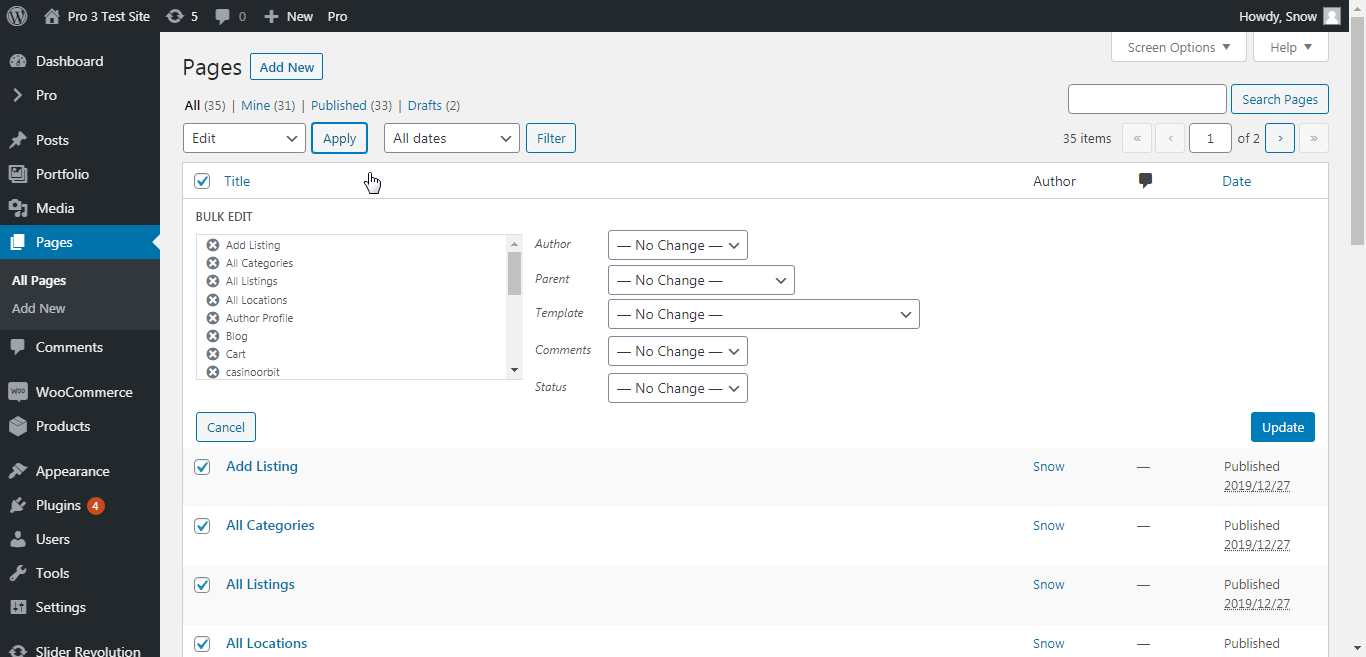
Have you tried the Wordpress native bulk edit?

I have tested this on my dev site and it seems to work (without editing anything, just pressing the update button). Do this on your own risk though as I have not done this on a live site. To play it safe always keep a backup of your entire site.

Thanks,

This topic was automatically closed 10 days after the last reply. New replies are no longer allowed.