Buggy Cornerstone and issue with 404 page

Hello.

I need help on my site.
I’ve been looking for it a while, but am not getting how I can send you a private message including the Site’s login data.


Cornerstone not working

I already started working with Cornerstone (and I cannot go back to visual editor as I have limited time due to job budget). When I started adding content, Cornerstone was working. However I cannot go further now.
No particular change or setting between the day Cornerstone worked, and the day it didn’t, and I tried several browsers and all the basic testing before contacting you.

If I try to duplicate objects, the duplicated objects take no position in the Columns. The duplicated element disappear from the GUI so I have to determine where they are (exiting Cornerstone, which sends you to the Dashboard) and reload each time.

  1. Can you contact me in private so I can send you the login data?

Is Cornerstone working like that?

I could go on cloning posts with the Duplicate Post plugin, but I cannot add the cloned posts to the content of destination page, due to the fact that Cornerstone doesn’t allow saving any change outside its interface. It deletes any existing content in the Post.

  1. How do I add an element from another page, without having to copy settings of each element from a page to another?
  2. Is there a way to modify the page content in Visual or Text mode, to see if I can adjust things outside Cornerstone? Did I completely miss the way you provided to edit Cornerstone content outside its interface? Or the choice is between Cornerstone (and no control on page) and control on pages (but no elements I saw on Demo)?
  3. Could the Clone Plugin be the cause of Cornerstone not working?

404 Page and Full Height

I saw that functionality among the plugins packed with the Theme so I said, let’s do the custome 404 page.
Unfortunately in the Front End, the 404 page showed only two or three lines of shortcodes instead of the 404 Page I was seeing well in Cornerstone.
I also tried adding a third party Plugin I normally use when must do 404 custom page. Doesn’t work with your Theme however.

  1. Can you arrange things so I can have a 404 page showing the shortcodes appearance?

I see you’re advicing other people (who also asked for fullheight posts or sections) to use a Slider.
However this way, the text inside is unreadable for lower viewports.

  1. Do you plan to add that function? Did you provide a way to achieve it with the last updates?

Looking forward for solutions.
Thank you

Hi there @S.r.l,

Thanks for writing in! You should see a “Secure Note” button that you can use to attach login details if required.

On to your questions:

  1. You can’t copy elements to another page with their settings intact. You can save a Cornerstone page as a block and then use that on the other page. This will take a selection of elements and styling and you’ll then be able to use them on other pages. However this is aimed at creating things like contact blocks etc, rather than using it on a per element basis.

  2. This isn’t possible, the way most page builders work is to save the data in the database directly and as such the content can only be edited within the interface of the page builder. If you edit a page or post that was created in Cornerstone originally outside Cornerstone, you’ll then no longer be able to edit said page or post in Cornerstone.

  3. The clone plugin could cause issues depending on exactly how it works, Cornerstone works with specific post meta and it’s important this isn’t broken.

  4. You can use the extension that comes with X called “custom 404”. Create a page in Cornerstone, then set that as your custom 404 page in the custom 404 settings, this should all work correctly. :slight_smile:

  5. For full-height posts? This would currently be achieved with custom CSS.

Thanks!

Hello,

I wrote you on Friday after a tough day trying to work with Cornerstone. With Saturday Cornerstone update, the issues got fixed themselves and now Cornestone works as expected, so for now I have what I need to go further.
Your “custom 404” plugin was my first try, but it showed the Cornerstone shortcodes on the frontend. Now it works however.

[quote]You can save a Cornerstone page as a block and then use that on the other page.[/quote] I don’t find that function. Can you tell me how to do it directly, or point me to the tutorial or documentation who explains how?

Since Cornerstone cannot be edited in text and doesn’t work seamlessly with Wordpress text editor, I cannot copy and paste the shortcodes to a new page. With this “block” function, will I be able to introduce a saved template block (finale result would be equal to copy and paste that block), without erasing what’s already inside the page. Is that right?

[quote]For full-height posts? This would currently be achieved with custom CSS.[/quote] Since you know the Theme structure better than I do, can you give some information about how?
I used .full-height{margin:0px; height:100vh;} for the container, as it’s supposed to be fully supported for recent Browser versions.

Thank you.

Hi there,

Please kindly make sure that you use version 2.1.3 of Cornerstone by going to plugins menu. If not please kindly update that.

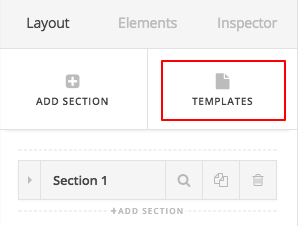
Now go to the content building view of the Cornerstone in a page and at the top section when you are in the Layer mode you will see an option for the Template:

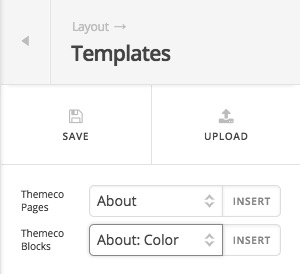
There you will find the options my colleague talked about:

Regarding the Full eHeight functionality, would you please kindly open up a separate thread and give us detailed information with URLs of what you want to achieve so we can suggest you the proper way to do so.

Thank you.

Thank you.

You are welcome!