Bug Report - Cornerstone Forms - Updating ACF Data

I was attempting to create a form that updated ACF Data in field group in a Custom Post Type.

Using the Post Update action I added an ACF meta field (e.g. {{dc:acf:post_field field=“movie_description”}}) for the name and the form input (e.g. {{dc:form:data key=“movie_desc”}}) for the value. This initially appeared to update the metadata field, but then ALL posts in that type were completely erased.

I replicated this issue on two separate builds.

Luckily this was done in test environments, but if someone were to attempt this same action on a live site with insufficient backups it could be catastrophic.
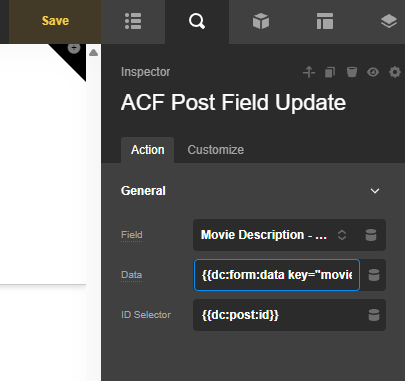
Hello @mgalindo,

Thanks for writing in!

Please make sure that you are using the form in a single layout and that the post ID has a value as well.
image

We would be happy to double check your site if we can log in. You can create a secure note in your next reply with the following info:
– Link to your site
– WP login URL
– WP username
– WP password
– WP Administrator Role
– Confirmation that we can access and make changes to your site

To know how to create a secure note, please check this out: How The Forum Works

image

Best Regards.

Ruenel,

This isn’t used in a single layout as I was testing it to use in a dashboard to let users edit their own post submissions. I was using loopers to get the necessary post data. The issue wasn’t the targeting, I was able to edit the post data just fine.

It seems that my error was using Post Field Update and not ACF Post Field Update. Since I wanted users to be able to edit the Post Title along with other ACF data, I originally thought using Post Field Update and adding the other fields as metadata to be updated would have been better than adding two post actions.

That being said, accidently using the wrong element in a post action should not result in every single post in the post type being erased.

Good to know that, @mgalindo.