BuddyPress POST button missing in Theme X

Hi there,
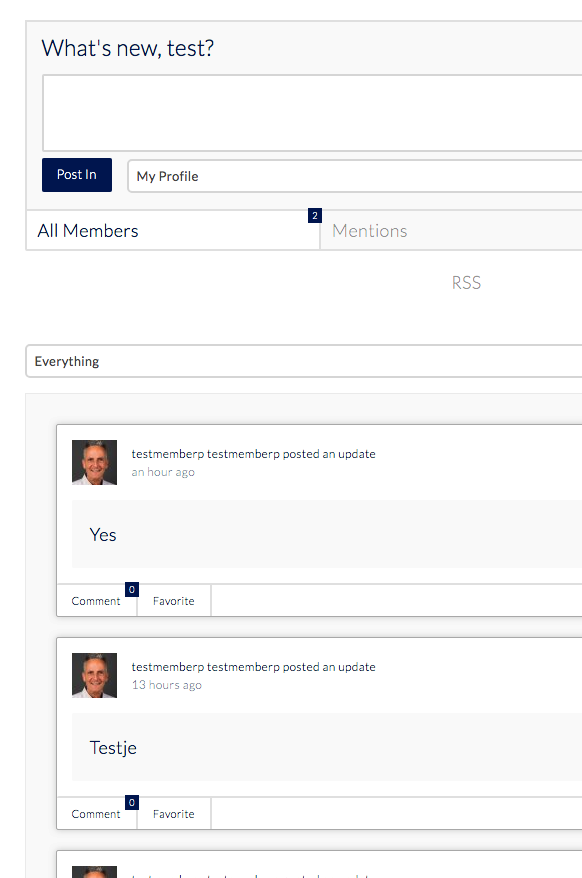
I have X-Theme Pro latest Version and BuddyPress latest version running on latest Wordpress. The POST button is missing within BuddyPress.
I have tried disabling all Plugins but this did not solve the problem. I tried other themes and the button shows up then! But not in X-theme! Can you plese help me?

Kind regards, Tiny
Hello Tiny,

Thanks for writing in!

To resolve your issue, please add the following CSS code in the X > Theme Options > Global CSS (http://prntscr.com/evui3r)

.buddypress #whats-new-form #whats-new-options {
    display: block;
}

.buddypress #whats-new-form #x-whats-new-options-inner {
    padding: 4px 0 0;
}

We would love to know if this has worked for you. Thank you.

Hi RueNel, I am very happy and greatfull, YES it’s working fine!
However I noticed that in Activity messages the link button is half hidden (on mouseover). How to make the button visable? See screendump: http://soulmatesxl.com/Button%20half%20hidden%20on%20mouseover.png
And as you can see the “Latest updates” are with way too large font… How to make them smal?
Kind regards, Tiny

Hey Tiny,

I have logged in again and I could not replicate the issue.
This is what I am seeing:

Please clear all your caches or use private browsing mode and test the site again.

Hi, In Chrome it is all hidden, but when you go over the area (above the light grey block) with the mouse, you will see the mouse change en you can click on the (invisible) button.
In Firefox the top of the button is only visible.
Will this help you to reproduce?

And another thing: And as you can see the “Latest updates” are with way too large font… How to make them smal?

Kind regards, Tiny

Hi Tiny,

It turns out to be the tooltip when you hover the hours. It is a buddypress issue. The result is different on firefox and chrome. I tried to adjust the position but there’s conflict between two browsers

.view.activity-time-since.bp-tooltip::after {
    left: auto;
    top: -23px;
}

If you want to hide this tooltip instead, please try adding this:

.view.activity-time-since.bp-tooltip::after {
    display: none;
}

For Latest updates font size adjustment, please try adding this custom CSS too:

.activity-list.item-list blockquote {
    font-size: 14px; /*Adjust 14 to your preferred fotn size*/
}

Hope this helps.

THANK YOU SO MUCH! It’s fixed now :slight_smile:
I appriciate your great and fast supprt.
Kind regards, Tiny

You’re most welcome, Tiny.

This topic was automatically closed 10 days after the last reply. New replies are no longer allowed.