Break Cornerstone Viewer

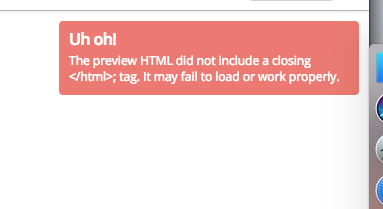
Hello, after all the settings made and installed plugins I started to create my home page and services … until then everything was normal … suddenly after working on creating another page by Cornestone broke everything in the viewer.

When accessing the page in the browser is normal.

I looked in the forum and could not find anything that would show me the way of this bug.

can you help me?

Credentials to follow.
Hi There,

Thanks for asking!

I can see there is plugin conflict showing in your site.

This usually happens due to the W3 total cache plugins. Please disable cache plugins and clear cache. Try loading the editor, and let us know how it goes.

Thanks

I’ve already disabled it and the warning still remains the same warning.

unsuccessfully!

Hi There,

Did you clear the cache before you deactivate it? I don’t see the error anymore and the layout of the page on Cornerstone seems to be fine. Please clarify how we can replicate the issue.

Thanks,

Yes, first I cleared the cache after I deactivated it. Here on my side I have the same problem … the home page is still broken.

Strange … mysteries!

Hello There,

The issue usually happen when you enable the minify option in W3 Total Cache. Please keep in mind that all the JS and CSS file in the theme were already minified. Enabling the minify option in your caching plugin will result to an issue because it will minify the minified file. We strongly suggest that you minify the html but exclude the JS and CSS files. You may only combined these files without having to minify it.

Hope this explains it.

This topic was automatically closed 10 days after the last reply. New replies are no longer allowed.