Hi there, I can’t figure out why the word ‘Blog’ appears in the breadcrumbs. It only repeats the Home page (icon).
Is it necessary ? Can I turn it off ?
Hi There,
Please go to X->theme Option -> Header in MISCELLANEOUS section you can turn it off.
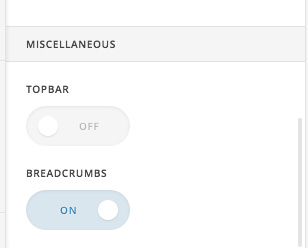
Hope this helps!
Hi @basanta. Thanks for your very prompt reply! However, I do want to display the breadcrumbs but not the ‘Blog’ text.
Hi there,
Please try this code in the Global CSS:
.category .x-breadcrumbs :nth-child(2),
.category .x-breadcrumbs :nth-child(3) {
    display: none;
}
Hope this helps.
Great. Thanks!
You’re most welcome.
This topic was automatically closed 10 days after the last reply. New replies are no longer allowed.