Breadcrumb not working in Portfolio

The breadcrumb seems to be displaying incorrectly on portfolio item pages: http://vellerosus.com/resources/heritage-heroes/

It should show [home icon] > Resources > Portfolio Item Title

The only thing I’ve done with the breadcrumb is turn it on. It works as expected on individual blog posts.

What do I need to do to fix this?

Thanks
Hi jqgill,

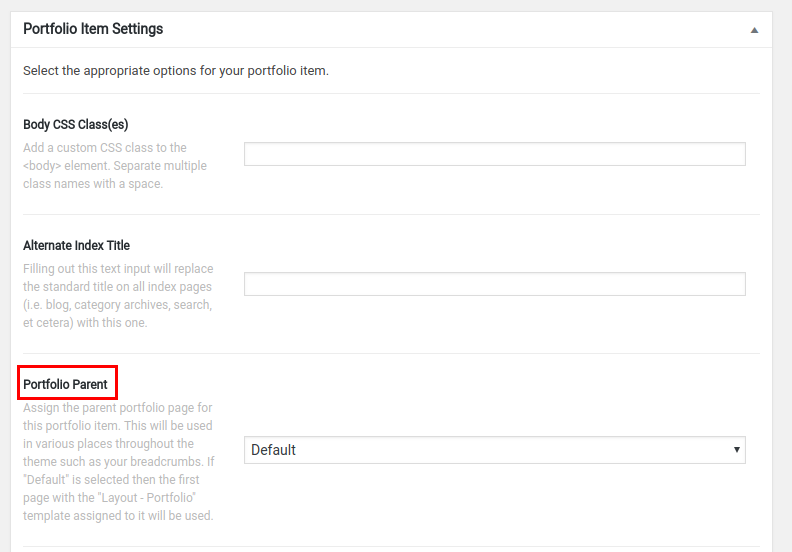
Ideally, it should show the “Portfolio Parent” set in Portfolio Item Settings as in this screenshot:

With the “Default” option set there, the first page with “Layout - Portfolio” template should be automatically assigned, however, there is a bug we have currently that prevents that. We are aware of this bug and it’s scheduled to be fixed.

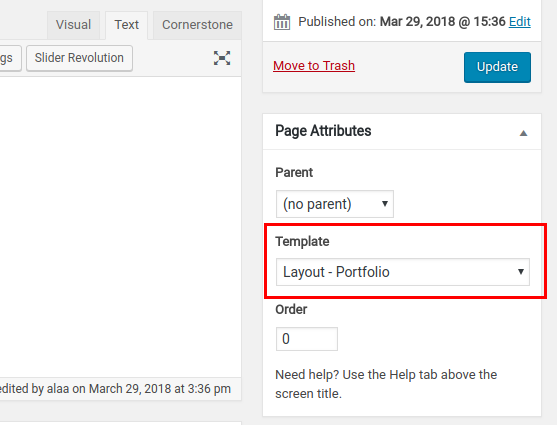
One workaround for this issue is to create a new page and set “Layout - Portfolio” as its template:

then choose that page for each portfolio item in “Portfolio Item Settings”.

Thanks.

Okie doke. Thanks for your help, Alaa.

On behalf of my colleague, you’re welcome. Cheers! :slight_smile:

This topic was automatically closed 10 days after the last reply. New replies are no longer allowed.