When I’ve added a bottom navigation in the Header builder it adds the height of the bar to the bottom of the page, below the footer. Even though it’s an absolute bar and sticks to the bottom and sits on top of everything. Is there a way of removing that space?
Eg: https://staging.rubberduckers.co.uk/
Hi @RubberDuckers,
Thanks for reaching out.
I have checked your staging site and it seems that all the CSS. JS and images are missing during the migration. I would suggest you check and let us know for further investigation. Apart from that, I have investigated your live site through the Browser Debugger Tool and found that a Dropdown Modal element might be the reason behind your problem. You can check that too.
Thanks
That’s weird, it’s loading fine for me (and others) on different browsers/devices.
If you could check again, please.
This is a screenshot to show, the white bar at the bottom is because of the bar that the bottom header uses, but I don’t want the space there.

Hey @RubberDuckers,
I have replicated this issue on my end. To remove the space, set the Bar in your Bottom Header to auto.
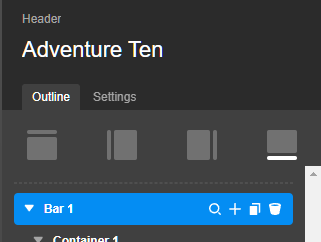
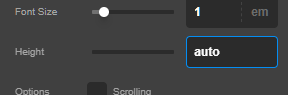
Thanks.
Perfect - thank you!
This topic was automatically closed 10 days after the last reply. New replies are no longer allowed.