Hello, how do i access the bottom footer to make changes?
Hello @marcelcroy,
Thanks for writing to us.
To make changes on X theme Footer you need to go to the X–>Theme Options—>Footer.
Please have a look at the given screenshot below.
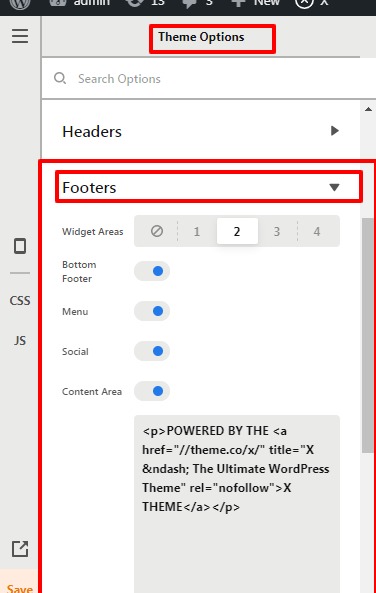
Hope it helps
Thanks

Hi @marcelcroy,
If you are still getting the issue shown in your screenshot, I would like to suggest troubleshoot the following common issue to help us to recognize the reason.
1.Plugin Conflict
2.Theme Update related issue
3.Child Theme Related issue ** If you have activated it.
4.CSS/JS Customization
5.Disabling Cache
6.Permalink
If you discover that an issue is coming from a custom code or 3rd party plugin, kindly consult with a developer or contact the plugin author. Please note that we do not provide support for custom codes and 3rd party plugins.
If that does not helps, please provide login credentials for your site in a secure note to examine it further, including:
– WordPress Site URL & Login URL
– WordPress Admin username/password
To create a secure note, click the key icon underneath any of your posts.

Thanks
Yes i saw that there was an update but was hesitant because even though i use a child theme it seems whenever i update the website gets a little messed up.
Hello @marcelcroy,
It is always a good practice to have a backup of the database and file before updating the theme.
It would be best if you could copy your live site to a staging server then update your theme there. In case if you haven’t seen our theme update doc please have a look at it.
After updating the theme you must purge all the cache and browser cache so that the latest code renders properly.
Hope it helps
Thanks
This topic was automatically closed 10 days after the last reply. New replies are no longer allowed.