Bottom and Top Separator will not work over a column that has an image as a background

Hi,
I cannot seem to find a way to get the top and bottom operator to work when there is an image set as a background. It’s like the image is ‘above’ it and the separator is acting as a layer behind it. Any help to get this desired look would be incredible! Thank you. :slight_smile:

Trying to do:


What we have currently:

Since messing with it the arrow pointing up on the image is now gone so we only have a rectangle with no angles haha. Appreciate the help again. I assume I am just missing something.

Hey @AK49_Logan_907,

To achieve your design, you need to set the Bottom Separator of the section above the “Our Work” section to Angle Out. Then, set the Top Separator of the section below the “Our Work” section also to Angle Out. You’ll get something similar to the screenshot below.

Hope that helps.

Hi,

Thank you for the help! I was able to get the bottom one to work with the image but the top one refused to overlap the image background. I recorded a small video to possibly help and show you what I’m trying. If you have any other tips regarding that issue it would be much appreciated!
Video: https://drive.google.com/file/d/1TlNViQpP4GLNkK5CrxWd-87J-upfMfeW/view?usp=sharing

I am running into another issue and this is where I have a bit of a knowledge gap. I’m trying to get these lines to be even with the words “Our Work”. I have changed the columns by pixels or percentage and I can’t seem to get a clean look as every screen it comes back drastically different.
Am I looking at this the completely wrong way? Is there some CSS that will level out those bars for the majority of screens?

Trying to do:


Have:

I’ll provide logins in case you would like to look. :slight_smile:

Hello @AK49_Logan_907,

Regretfully the given credentials is not working for us. Please double check it.

Meanwhile, as what @Christian has mentioned, the bottom separator must be applied to the section above and NOT on the Work section. Kindly update the credentials so we can check your settings.

Best Regards.

Hi,

Pretty sure I followed your instructions. as seen in the video. The creds are updated, thank you!

Hello @AK49_Logan_907,

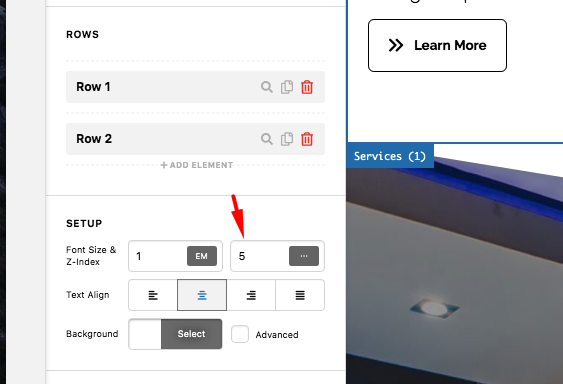
By default, each of the sections shares the same z-index which is 1. @Christian forgot to mention this in his reply. This means that the Work section displays on top than the Services section which is why the separator is not visible.

XKKtCPpwRp_rK-yTdQP2FA

I went ahead and change the z-index of the Services section and now the bottom separator displays.

Please check your homepage now.

This topic was automatically closed 10 days after the last reply. New replies are no longer allowed.