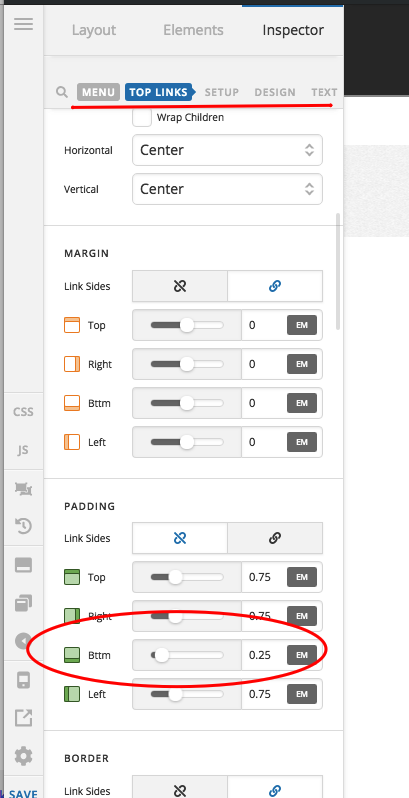
Border bottom on active menu object

Hi,

I’m trying to replicate the look of my main menu in an “in-line menu” on this page: https://cumatix.se/imu/imu-teknik/

I have added some custom CSS, but I would like the underline to stay on the active menu object, just as the blue color does. Is there a way to achive this?

Thanks,
/Sebastian
Hi @jonaskaapa,

Thanks for reaching out.

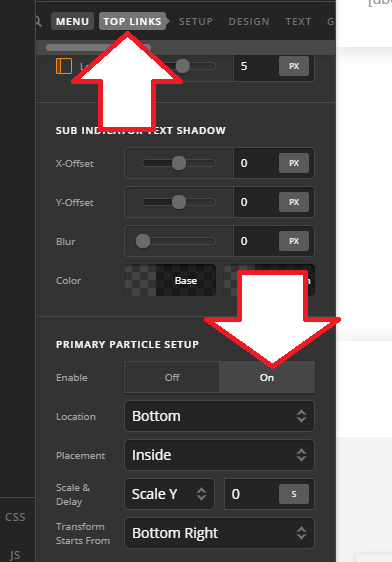
You can do that by enabling your Top links primary particle, example

Then you can style it the way you wish it, by default, it will be an underline.

Cheers!

Thank you very much! I have activated this now…

However, the underline does goes away when the link is pressed. Is there a way to make it stay when the text is pressed as well?

Please advice,

/Sebastian

Hi There,

Please try adding this custom JS under Theme Options > JS:

setInterval ( function(){ 

jQuery('.current-menu-item a').addClass('x-active');
jQuery('.current-menu-item a .x-particle').addClass('x-active');

 }, 500 );

Hope it helps :slight_smile:

Excellent, thank you!

Lastly, how do I modify the distance between the text and the line?

Thanks,
/Sebastian

Hello Sebastian,

To modify the distance between the text and the line, you must adjust the bottom padding of your menu items.

Hope this helps. Please let us know how it goes.

This topic was automatically closed 10 days after the last reply. New replies are no longer allowed.