Body font enlarge

Hi there

Is there a way or a css code so the body text can be larger? pls see URL of the page on secure note

Also – my old pages fonts have also been affected when I changed the font colour of this new page created with X THEME — or cornerstone – their fonts have become smaller – How to correct this? pls see another URL im referring to on secure note as URL #2
Hi There,

Please add the following CSS under Customizer > Custom > Global CSS:

.x-text p,
.entry-content p {
    font-size: 16px;
}
1 Like

THANKS a lot

sorry

Where to put this? on the STYLE BOX? there is a code there already for the white font from before
Do `i add it there? separate with a comma punctuation?

I did it

No effect whatsoever

please help

Hi again,

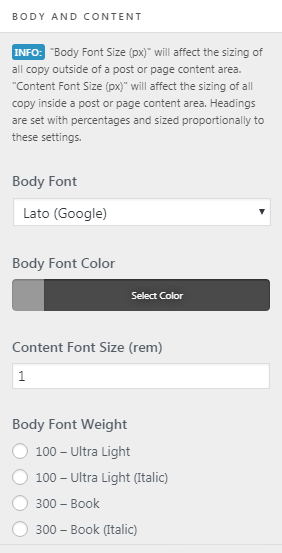
Please navigate to Appearance > Customize > Typography > Body and Content and in Content Font Size increase the font size (see screenshot)

You probably need to remove CSS customization so it’s not overridden by the CSS.

Hope this helps!

1 Like