Blog Sidebar Adjustments

Hello,

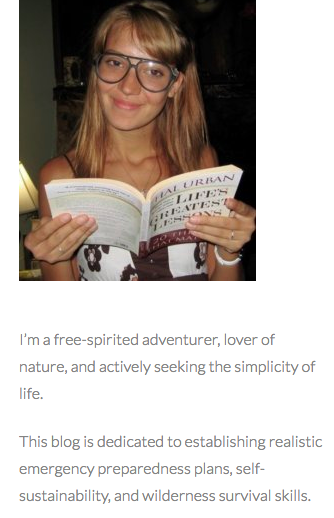
The image snippet below is from the sidebar on my blog: www.crisisequipped.com/blog

I would like to make my image size a bit smaller (maybe in an oval shape instead of a square, if possible?)
Also, is there any way to adjust the line height on the text below the image?
I want the lines to be closer together.
Thanks so much,
Nadia

Hi There,

Thanks for writing in!

You can re-upload a smaller image you want to be or use this CSS to make it bit smaller.
Add the CSS to X-> Theme Option -> CSS

#media_image-3 img {
width: 200px !important; /* you can adjust the value */
height: auto;
}

and add this CSS for line height for text.

.textwidget p {
 line-height: 1.2 !important;
}

Hope this works!

That worked.
Thank you so much! :blush:

You are most welcome. :slight_smile:

This topic was automatically closed 10 days after the last reply. New replies are no longer allowed.