Blog Preview error

Hi,
Thanks for any input in advance! I recently noticed an error on my blog preview page. Instead of previewing my blog, it is showing:

[cs_element_row _id=“2”][cs_element_column _id=“3”][cs_element_text _id=“4”][/cs_element_column][/cs_element_row][cs_element_row _id=“11”][cs_element_column _id=“12”][cs_element_text _id=“13”][/cs_element_column][cs_element_column _id=“14”][cs_element_image _id=“15”][/cs_element_column][/cs_element_row][cs_element_row _id=“21”][cs_element_column _id=“22”][cs_element_text _id=“23”][/cs_element_column][/cs_element_row][cs_element_row _id=“30”][cs_element_column _id=“31”][cs_element_image _id=“32”][/cs_element_column][/cs_element_row][cs_element_row _id=“39”][cs_element_column _id=“40”][cs_element_text _id=“41”][/cs_element_column][/cs_element_row]

It is now doing this on two of my blogs. Any suggestions?
thanks again! thought i would provide a link for a better visual on the problem, here is my blog preview page…

Hi there,

That is a typical case when you use page builders for the blog posts, in this case, Cornerstone. The blog listing page, cannot render the code generated by the Cornerstone that is why you see the underlying shortcodes of the page that you have created with Cornerstone.

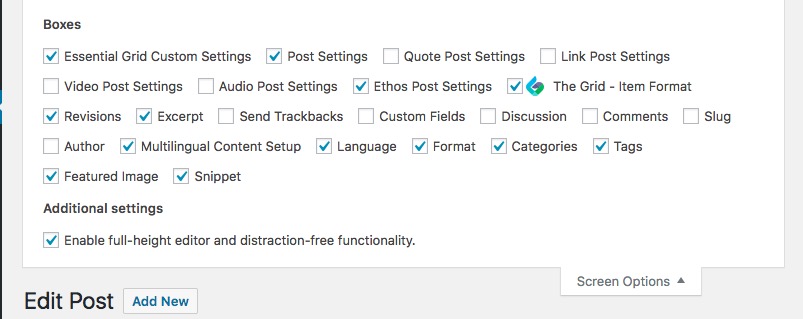
The only solution is that you go to each post and add a separate excerpt from the blog listing page. To do so you will need to enable the excerpt box from the screen options in the post edit page:

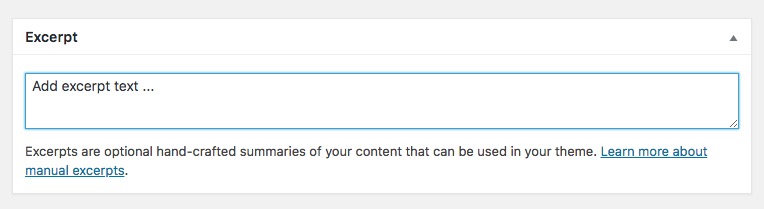
Now that the excerpt box is available you can use that to add your text to the blog listing page:

Thank you.

1 Like

Thank you!

You’re most welcome!

This topic was automatically closed 10 days after the last reply. New replies are no longer allowed.