I’ve just updated to the latest version of X, cornerstone and Wordpress. I am using the ethos stack, with a child theme, and have a static front page with my posts page set separately. When I go to the posts page I now get the text “Nothing to Show Right Now - It appears whatever you were looking for is no longer here or perhaps wasn’t here to begin with. You might want to try starting over from the homepage to see if you can find what you’re after from there”. Can you advise why this is the case and what I do to resolve this. If I roll back my install to the previous versions I was on i.e. Cornerstone 2.0.6, X 5.1.1. then my blog posts appear.
Hi There,
Is it your website: http://www.wotherspoonconsultancy.com/?
I couldn’t find the blog page on this website.
Could you please send us with the link?
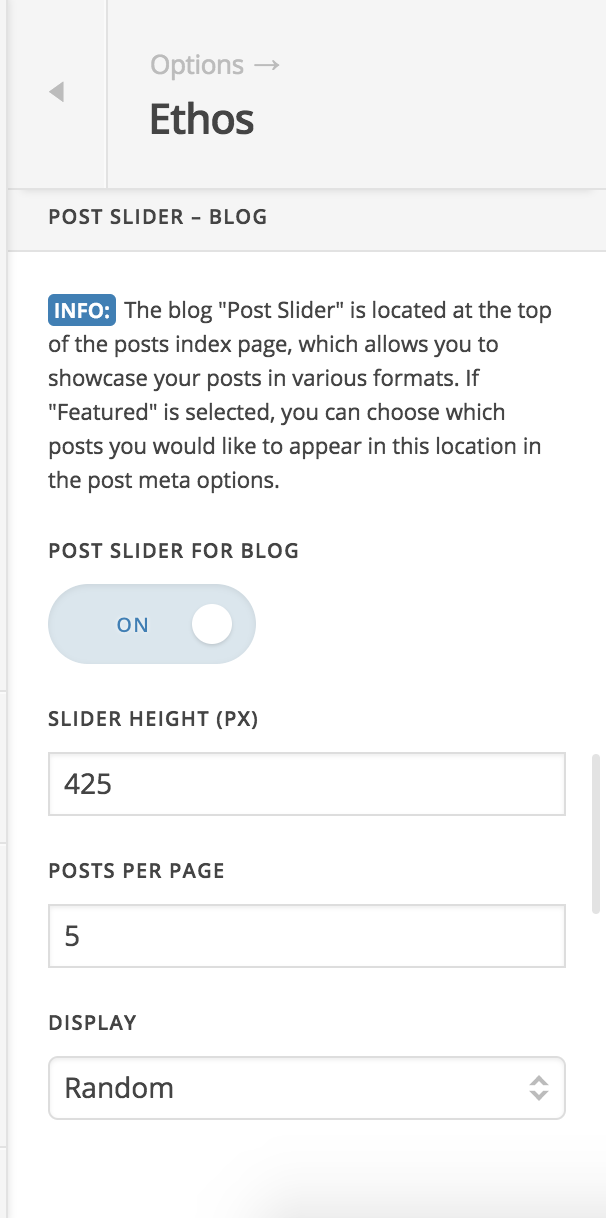
Also try changing the DISPLAY option under X > Theme Options > Ethos > POST SLIDER – BLOG to Random:
Let us know how it goes!
Thanks. It’s a subdomain, which I am using for development purposes - it’s password protected at development.wotherspoonconsultancy.com, to control access as the site isn’t live in its final version. However, changing the DISPLAY option under X > Theme Options > Ethos > POST SLIDER – BLOG to Random: worked for me. Thank you very much! The issues is resolved.
Glad the issue is resolved,
Cheers!
This topic was automatically closed 10 days after the last reply. New replies are no longer allowed.