Blog post showing on another Page (posts) not just under BLOG

Hi. SO far you guys helped me out a lot. I hope i can count one more time on you. I am trying to figure out one thing, but I do not know how you call this PAGE that shows different blog Posts.

EXAMPLE : to show my blogs on a page i had to make a empty page called Blog. All my posts have then shown on the page “blog”

Now I like to have other of these pages where I can link in other blog posts.
I like to make under the menu bar TRAVEL TIPS a submenu saying ITINERARY, this page is then showing all blog posts related which are itineraries, further a submenu named, Traveling with Kids, and all related blog posts will show there.

I hope i explained this well enough so anybody can guide me to the right place?

Thank you so much
Have a nice day
C
Hey Corina,

What you’re describing is a Category Archive page. WordPress automatically generates that page once created. Please see the guide at https://www.wpbeginner.com/glossary/category/.

Hope that helps.

yes this is it! super cool thank you. C

Can I now also layout this page? I.e have a side bar right to add some widgets?

Hi There,

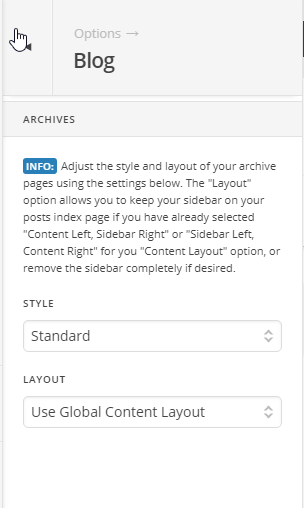
Please navigate to Theme Options > Blog > ARCHIVES > LAYOUT > select Use Global Content Layout:

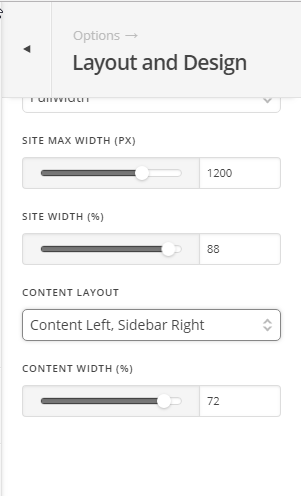
And under Theme Options > Layout and Design > Content Layout > should be set to Content Left, Sidebar Right:

Hope it helps :slight_smile:

hi thank you for your reply. It adds the side bar below the whole Post and not on the side ???
do you know why??

Maybe but not sure is this because when I make a post I do not select the add the text and photos in a content box? can’t be right??
I select a section, then photo and text and sometimes a header box if I do not change it directly in the text box to a H2 or h3.

thank you C

Hello There,

The widgets displaying at the bottom of the page were part of the Footer Widget Areas. If you want a sidebar, you really have to go to X > Theme Options > Layout and Design > Content Layout > and must select the “Content Left, Sidebar Right”.

If you already did, maybe you have added a custom PHP code that removes the sidebar. To better assist you with your issue, please provide us access to the site so that we can take a closer look at your setting.

Thank you.

This topic was automatically closed 10 days after the last reply. New replies are no longer allowed.