Blog Post Featurs

Hey there!

So was able to get it to move with just taking out the 75 causing the menu bar to reduce in size. which is fine for the moment, but i wasn’t able to find it in the CSS.

But my new question is, is it possible to change the color of the card that comes up on the blog.

http://blushschoolofmakeup.edu/blog/
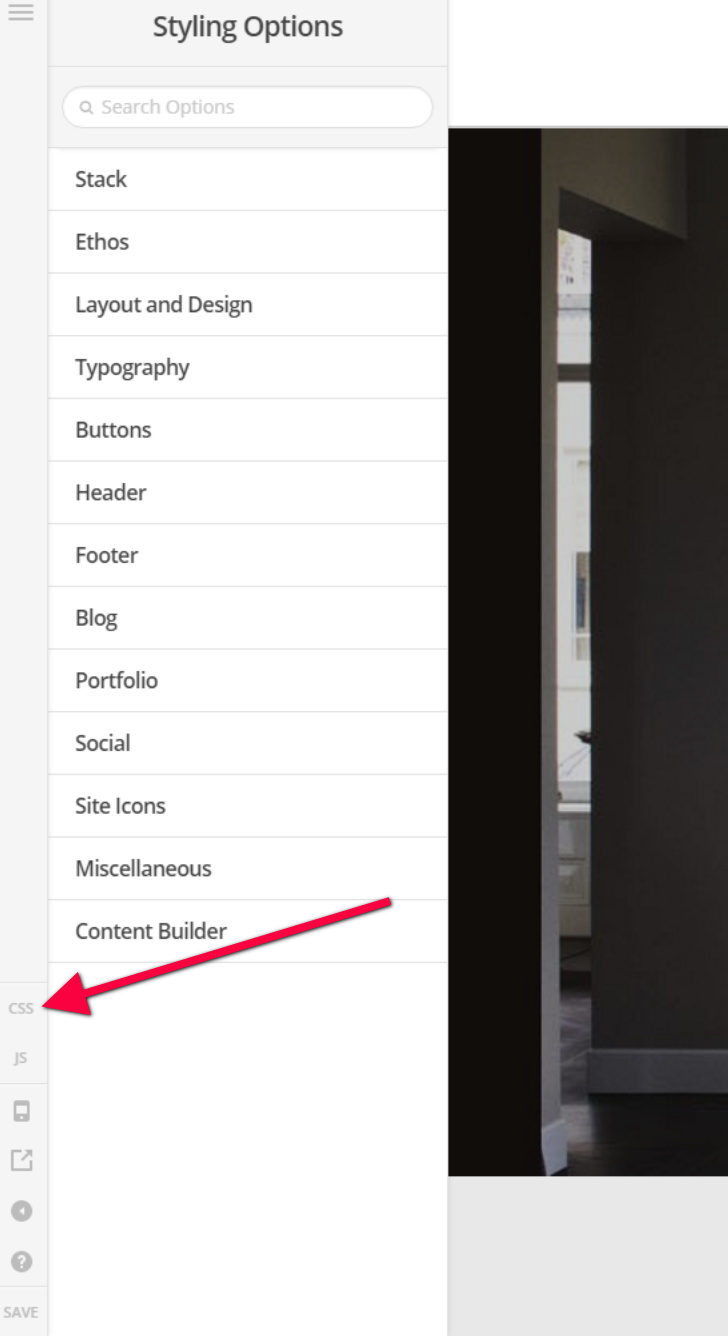
Hello @apadkins,

Thanks for asking. :slight_smile:

You mean to change the background color or the font color.

To change background color please use following CSS:

.entry-wrap {background-color: #ddd;}

Here is the CSS to change font color:

.entry-wrap h2.entry-title a {color: #947474;}

Thanks.

Hello again @prasant, thanks again for the response. I was hoping to change the color of the Boxes of the blog post. And for the CSS I only ever get to the global CSS. is there another sot that I’m just not seeing?

Hi @apadkins,

I have tried the code @Prasant provided and it seems to be working fine.

Kindly make sure you have added the code in X > Launch > Options > CSS.