Hello
On my site I have installed your global template. On my home page the 3 latest blog posts are featured with a square picture.
I edited a blog post and did not find any way to edit / change that picture.
Can you help ?
Thanks
Hello
On my site I have installed your global template. On my home page the 3 latest blog posts are featured with a square picture.
I edited a blog post and did not find any way to edit / change that picture.
Can you help ?
Thanks
Hi @steveraf,
Thanks for reaching out.
To change the featured image, please go to your post page and click edit.
Then find the settings and locate the featured image tab and you can now change the featured image.
Hope that helps and let us know how it goes.
Thank you.
I found  tanks
tanks
Hi @steveraf,
You’re welcome and it’s our pleasure to help you. If you have any other concerns, feel free to reach us.
Thank you.
Thank you - I need to edit the text of the blog page (top of the page) and cannot find it… haha thanks
Hi @steveraf,
You can change it from Pro -> Theme Options -> Integrity -> Blog Title -> Change the Title here.
Here is a screenshot.
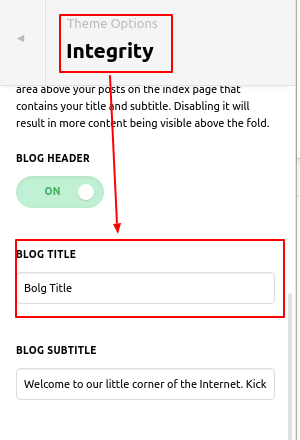
Hope it helps you.
Thanks
This topic was automatically closed 10 days after the last reply. New replies are no longer allowed.

