Hi,
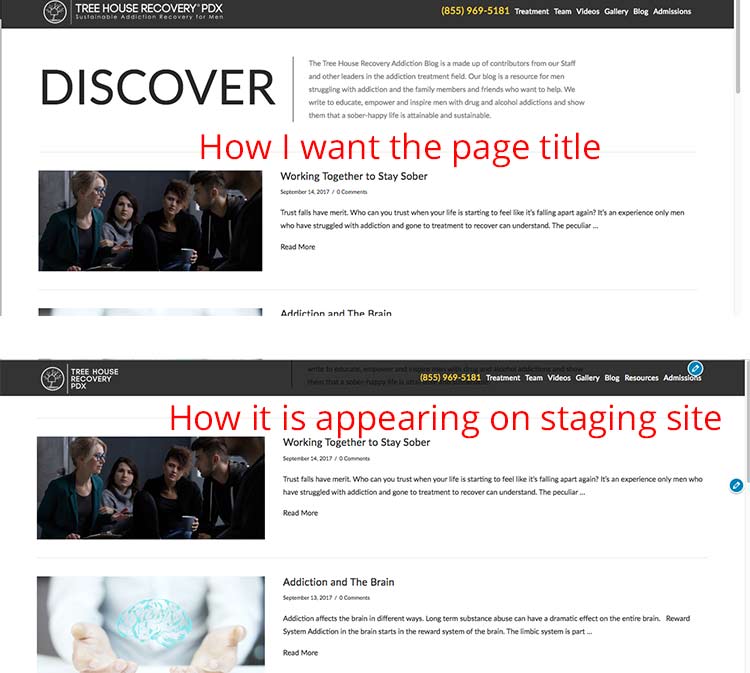
I am making some changes to my menu on a staging site. Everything looks good, except I am having some issues with the Blog index page. For some reason, the custom intro title and copy are all messed up on the staging site. Nothing changed about the customizations I made. Any idea How I can fix this? Image attached that shows the issue. Thanks!
You gave me the following code to create the title and intro for this page:
<?php // ============================================================================= // VIEWS/ETHOS/WP-INDEX.PHP // ----------------------------------------------------------------------------- // Index page output for Ethos. // ============================================================================= $is_filterable_index = is_home() && x_get_option( 'x_ethos_filterable_index_enable' ) == '1'; ?> <?php get_header(); ?><?php x_get_view( 'ethos', '_post', 'slider' ); ?>
<div class="offset cf">
<div class="<?php x_main_content_class(); ?>" role="main">
<?php if ( is_home() ) : ?>
<div class="custom-content">
<p>Add your custom content here</p>
</div>
<?php endif; ?>
<?php if ( $is_filterable_index ) : ?>
<?php x_get_view( 'ethos', '_index' ); ?>
<?php else : ?>
<?php x_get_view( 'global', '_index' ); ?>
<?php endif; ?>
</div>
<?php get_sidebar(); ?>
</div>