Blog page title not appearing (Default Template settings)

For some reason the “Blog” title on my blog index page is not appearing. This seems to be because the “Default Template” has the title turned off. Previously there was a slider at the top of the page, which I turned off. I don’t want the slider to appear, I just want “Blog” to appear at the top of the page.

Can you point me to where I can change the page title options in the Default Template? Thanks!
Hi There,

Please find this custom CSS:

.masthead {
    position: absolute;
    width: 100%;
}

And change to this:

.home .masthead {
    position: absolute;
    width: 100%;
}

Let us know how it goes!

Thanks for your reply. I did make the change in the CSS, which causes the masthead block to appear. However, there is no title in it. How do I make the page title – “Blog” – appear?

FYI, this is the site I’m working on: http://wp.jbhworks.com/blog/

Thanks!

Hi There,

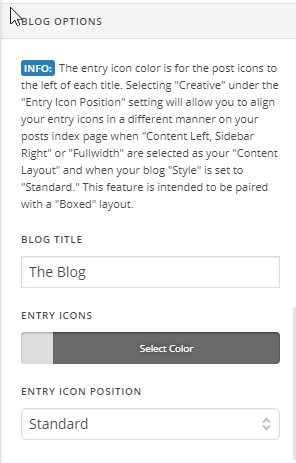
Please navigate to X > Theme Options > Renew > BLOG OPTIONS > insert the BLOG TITLE:

Regards!

Aha! That’s what I was missing. Thanks so much for your help.

You’re welcome!
Thanks for letting us know that it has worked for you.

This topic was automatically closed 10 days after the last reply. New replies are no longer allowed.